
API tokens
Long-lived organization tokens for CLI and programmatic access — create them with a role and scope, copy once, revoke instantly.
Organization → API Tokens manages long-lived tokens scoped to your organization. They exist so non-interactive clients — the CLI, CI pipelines, scripts — can authenticate without a browser sign-in.
A request authenticates by sending the token as a bearer credential together with the organization ID:
Authorization: Bearer <token>Every service verifies the token in-process — signature and revocation — on each request.
Creating a token
A token is created with:
- Name — how it appears in the list.
- Role — what the token may do: Developer (build within a workspace), Workspace admin (manage one workspace), or Org admin (everything, org-wide).
- Workspace — required for the two workspace-scoped roles; org-admin tokens have no workspace.
- Expiry — no expiry, 30 days, 90 days, or 1 year.
The token value is shown exactly once, at creation. Copy it immediately and store it in your secret manager — the console cannot display it again.
For CI, prefer a developer or workspace-admin token scoped to the
workspace the pipeline deploys into, with an expiry — not an org-admin token.
See CLI authentication for wiring it up
(initializ auth login, or INITIALIZ_TOKEN / INITIALIZ_ORG_ID /
INITIALIZ_API_URL in CI).
Reading the token list
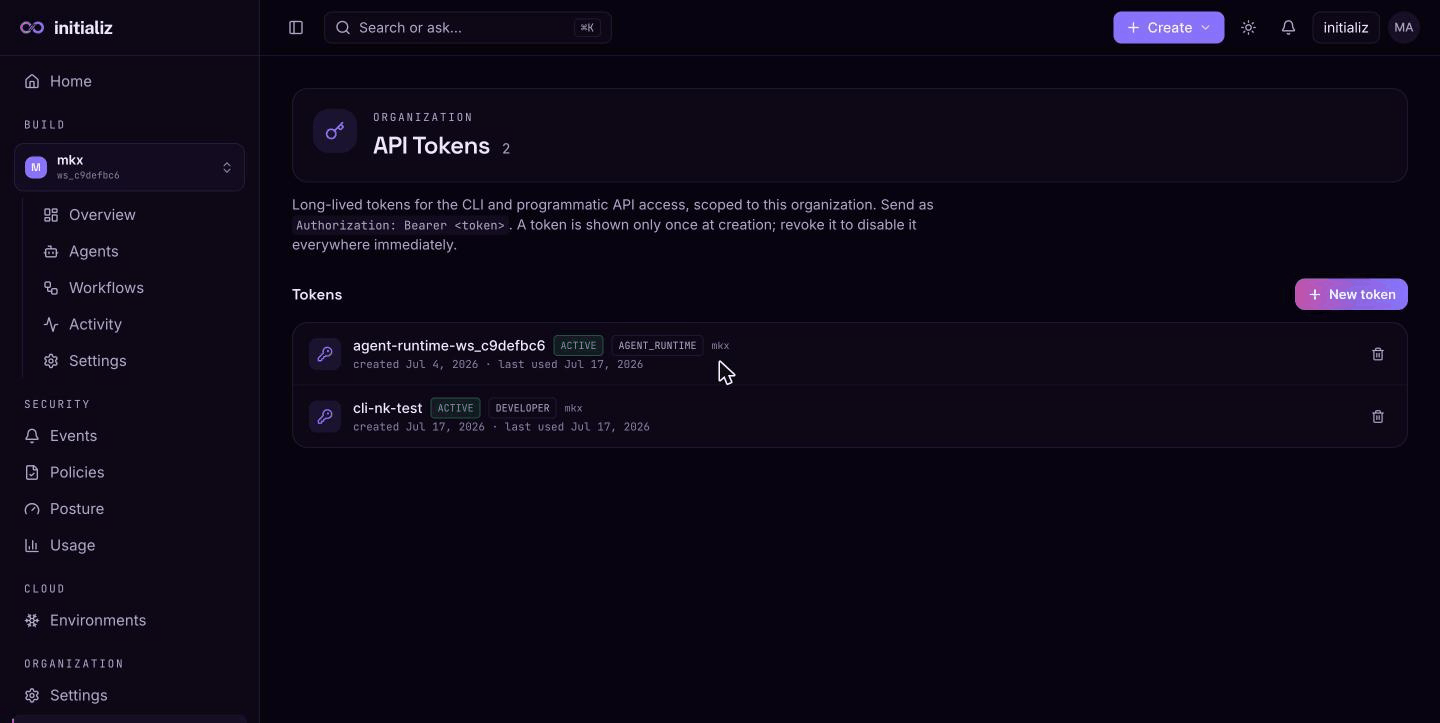
Each row shows the token's name, status (active or revoked, with revoked
tokens struck through), its workspace scope if any, and its created /
last-used / expires timestamps — last-used is your signal for spotting
abandoned tokens worth revoking.
The list is scoped to the owner: you see the tokens you created. Org admins see every token in the organization, so they can audit and revoke tokens org-wide regardless of who created them.
Revoking
Revoking a token is a one-way status flip: it is rejected everywhere on the very next request. The row stays in the list (struck through) for the record. Revoke immediately if a token leaks — and treat any token that has ever appeared in a log, shell history, or ticket as leaked.
Handling tokens safely
- Treat tokens like passwords: never commit them, never paste them into chat or issue trackers.
- Pass them via environment variables or stdin (
initializ auth login --token-stdin) so they stay out of shell history. - Prefer expiring tokens and rotate before expiry; use one token per pipeline so a leak has a small blast radius.
Organization settings
Manage organization membership and org-wide defaults — invite users by email, assign org or workspace roles, set the default workspace, and find your org ID.
CLI
The initializ CLI for CI pipelines — deploy CI-built agent images, rotate agent secrets, and inspect deploys from your pipelines.