
Compliance and tool-call decisions
Value-level governance of tool calls — compliance rules that allow, defer for approval, or deny each call over its actual argument values, with an org baseline and per-agent tightening.
Security policies decide which tools an agent may have. Compliance policies decide what a permitted tool may do on each call: when an agent has Enforce PDP policy enabled, the platform's policy decision point (PDP) evaluates every tool call the agent proposes — over the call's actual argument values — and returns one of three verdicts:
- allow — the call proceeds.
- defer — the call is parked until a human approves it (see Approvals and consents).
- deny — the call is refused. Denies are the default: a tool call that no rule matches is denied.
This is a different altitude from the security policy deny/allow lists: those gate capabilities; compliance rules gate individual calls by value — "transfers under $100 are fine, larger ones need approval".
Two scopes: org baseline and per-agent tightening
Compliance rules are authored at two scopes that compose:
- Org baseline — authored under Governance → Policies → Compliance. These rules apply to every agent that calls the governed tool: author a rule once and it governs the operation across the org.
- Per-agent overlay — authored on each agent's Governance tab. The
overlay can only tighten the baseline, never widen it: the two scopes
are composed most-restrictive (
denybeatsdeferbeatsallow), so a per-agent author can add a stricter threshold or an extra approval, but can never loosen an org rule.
The agent's Governance tab shows the whole picture in one card, in three parts:
- Tools in use — the governed (API and connected-server) tools this agent depends on, with their operation counts. These are the only tools you can author agent-scope rules for.
- Inherited from org — the org baseline rules that govern this agent's tools, shown read-only exactly as they will apply. Rules for tools the agent doesn't use are filtered out; the baseline itself is edited on the org Compliance screen.
- This agent's rules — the tighten-only overlay, edited in place.
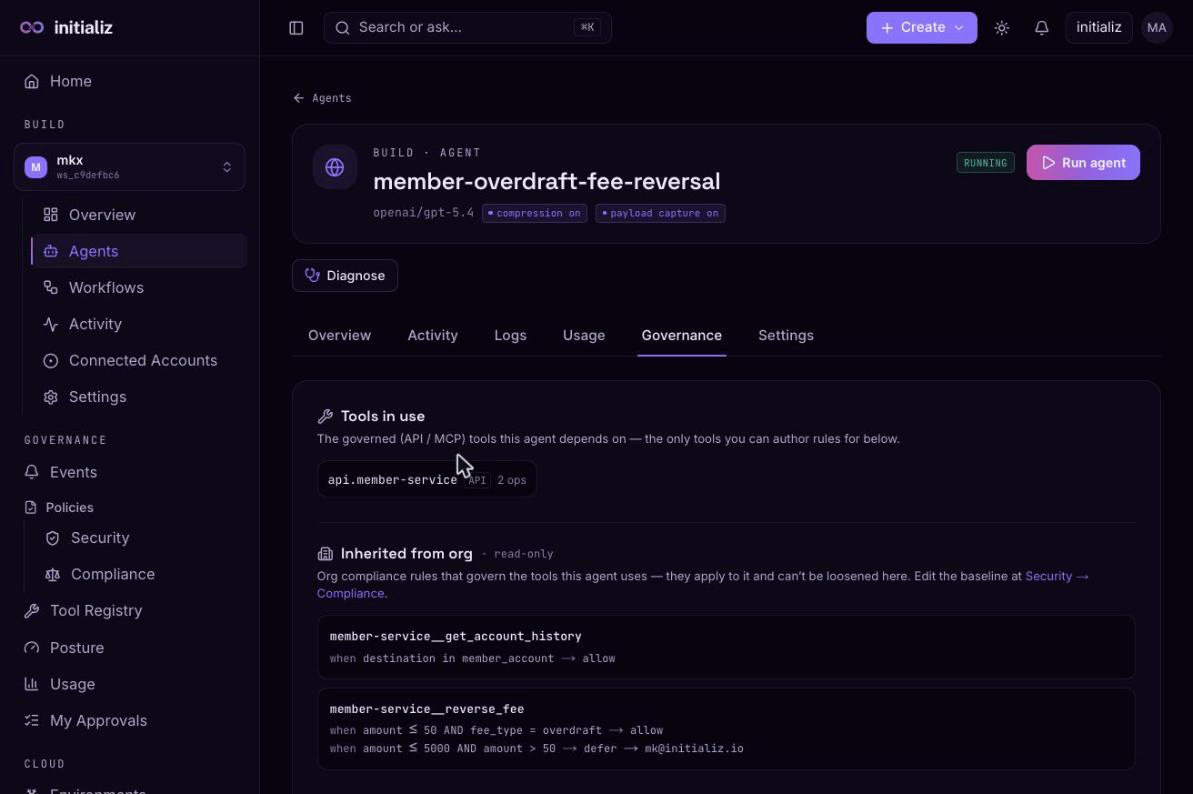
A scope with no rule for a tool abstains; if both scopes abstain, the call is denied. When both scopes independently defer, the approval requirements compose most-restrictively too — the approver lists are combined and the shorter timeout wins.
Beneath the compliance rules, the org policy also carries a hard allow/deny ceiling on tool operations, managed by org security admins and not shown on the Compliance screen. An operation outside that ceiling is denied regardless of any compliance rule. A second ceiling control, trust-mode floors, can additionally require a minimum caller attestation and restrict the delegation modes per operation.
How rules are keyed
Rules are keyed per tool operation, written <server>__<operation> — for
example payments__reverse_fee. The key is identity-independent: one
rule governs the operation no matter which connection or identity variant of
the tool a particular agent calls through. Only operations of tools admitted
to the Tool Registry can be governed — a call to an
operation no registered tool provides is denied.
What a rule looks like
Each tool operation carries an ordered list of rules; the first rule whose conditions all match decides the call, and if none match the call is denied.
A rule has:
- Conditions — typed comparisons against the operation's argument fields
(the fields come from the registered operation's schema). Operators:
≤,<,≥,>,=,≠,in, andnot in. All conditions in a rule must hold for it to match. - An outcome —
allowordefer. (There is no authoreddenyoutcome: deny is what happens when nothing matches.) - For
defer, an approval authority — the approver emails who may decide the parked call, and a maximum timeout the approval may wait.
For example, on a fee-reversal operation: allow when amount ≤ 100; defer to
finance-lead@example.com with a 1-hour timeout when amount ≤ 1000 — and
anything larger matches no rule and is denied.
Deferral routing
Where a deferred call's approval prompt is delivered is configured per agent, on the agent's Governance tab, per tool operation:
- Platform inbox (the default) — the prompt appears in the approvers' My Approvals queue in the console.
- Slack channel — delivered as an interactive Slack message, when the agent has Slack connected.
- Email — delivered to an email address.
The effective timeout is the smaller of the agent's route timeout and the compliance rule's maximum — the agent may tighten the window but never extend it. If neither sets one, the runtime's default (10 minutes) applies. A deferral that expires undecided is refused.
Fail-closed enforcement
Enforcement is opt-in per agent with the Enforce PDP policy toggle (set when creating the agent or in its configuration). With it on, evaluation is strictly fail-closed:
- No compliance policy configured at either scope → every governed call is denied.
- The operation is not governed by any registered tool → denied.
- The platform cannot read the policy or the registry at decision time → denied. An authorization decision never fails open.
Because the decision is made live on each call, publishing a compliance change applies to the very next tool call — there is no propagation delay and no agent redeploy.
Decision audit trail
Every verdict — allow, defer, and deny alike — is recorded in the event stream:
tool_call_decided— the platform's decision record: the tool and operation, the decision and reason, which scope bound the verdict (org or agent), the policy versions consulted, and a bounded summary of the argument values. Denials are a permanent record, not just a block.pdp_decision— the agent-side enforcement record, emitted by the agent runtime as it enforces the verdict.
Both are part of the Events screen's default security-relevant filter.
Authoring in the console
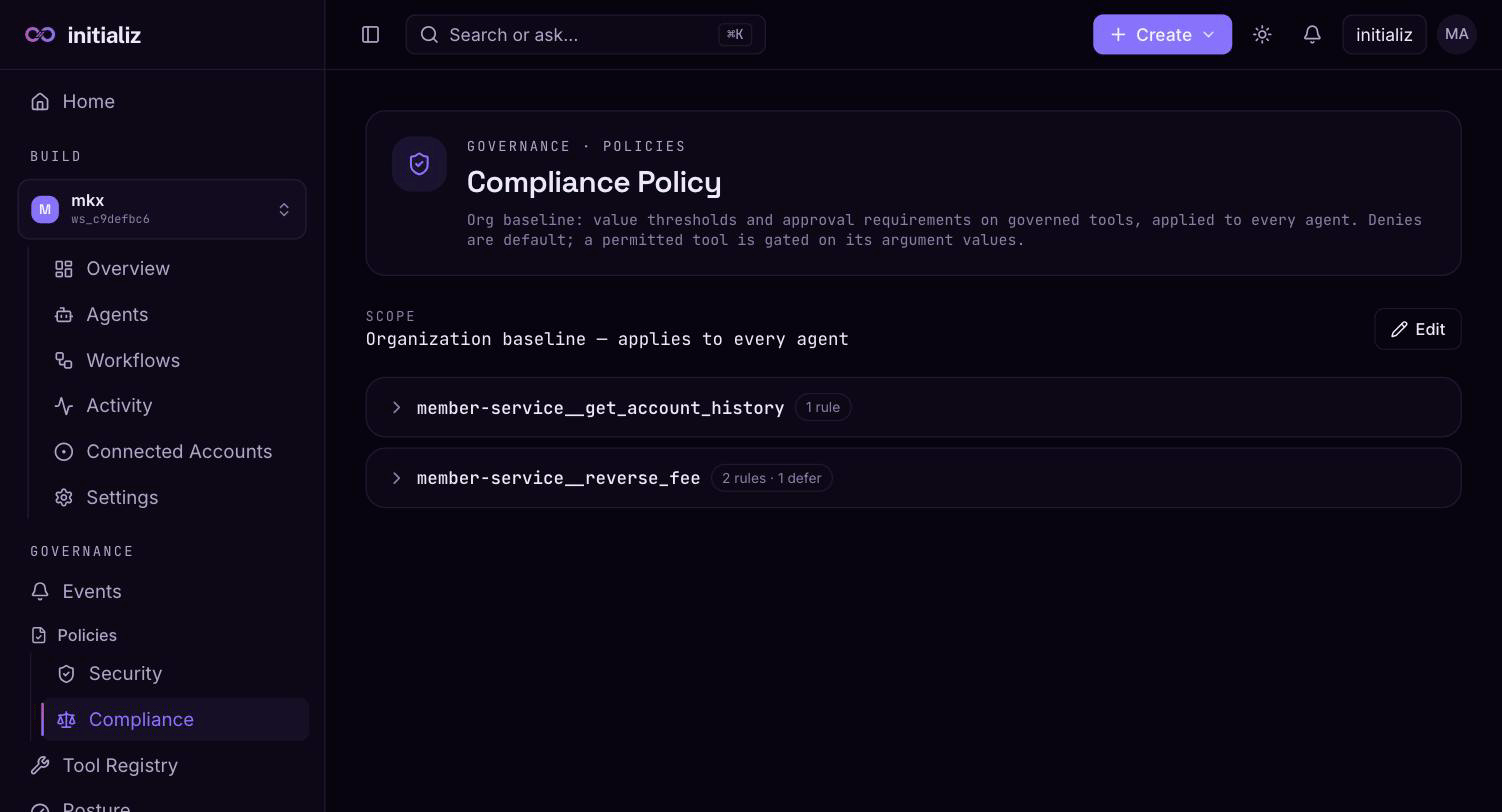
The Compliance editor (org scope under Governance → Policies → Compliance, agent scope on the agent's Governance tab) is built for large policies:
- Tools and their rules are collapsible and collapsed by default, each showing a one-line summary; a filter box finds a tool by name.
- Add tool opens a picker over the operations of registered tools, so rules are always authored against a real, governed operation and its typed argument fields. At org scope the picker offers every registered tool; at agent scope it is limited to the agent's own tools — you can't author an agent rule for a tool the agent doesn't use.
- Add rule inserts a worked example (an allow-with-threshold) so the condition shape is obvious, then you edit it in place.
- Rules are shown in evaluation order — remember the first match wins.
Compliance policies are versioned: every publish increments the policy version, and decision records carry the version that produced them.
Authoring requires the compliance-author permission; the console shows the editor to signed-in users, but the platform enforces the permission on every write — an unauthorized publish is rejected regardless of what the console displays.
Policies
Org-level and workspace-level security policies, the effective policy resolution, versions and rollback, and how changes reach running agents.
Trust-mode floors
Per-tool minimums for who may call what — the minimum caller attestation and the allowed delegation modes per registered tool operation, authored by security admins and enforced by the platform's policy decision point.