
Policies
Org-level and workspace-level security policies, the effective policy resolution, versions and rollback, and how changes reach running agents.
Security policies define what agents may not do (deny lists), what they are limited to (allow lists), which guardrails they must run (required), and the numeric ceilings they operate under (limits). Policies exist at two scopes — org and workspace — and every agent runs under the combination of both.
In the console, policies live under Governance → Policies, split into three areas:
- Security — this page: the org/workspace security policy described below.
- Compliance — value-level rules on individual tool calls (allow, defer for approval, or deny over the call's argument values), covered in Compliance and tool-call decisions.
- Trust-mode floors — per tool operation, the minimum caller attestation and allowed delegation modes, covered in Trust-mode floors.
What a policy controls
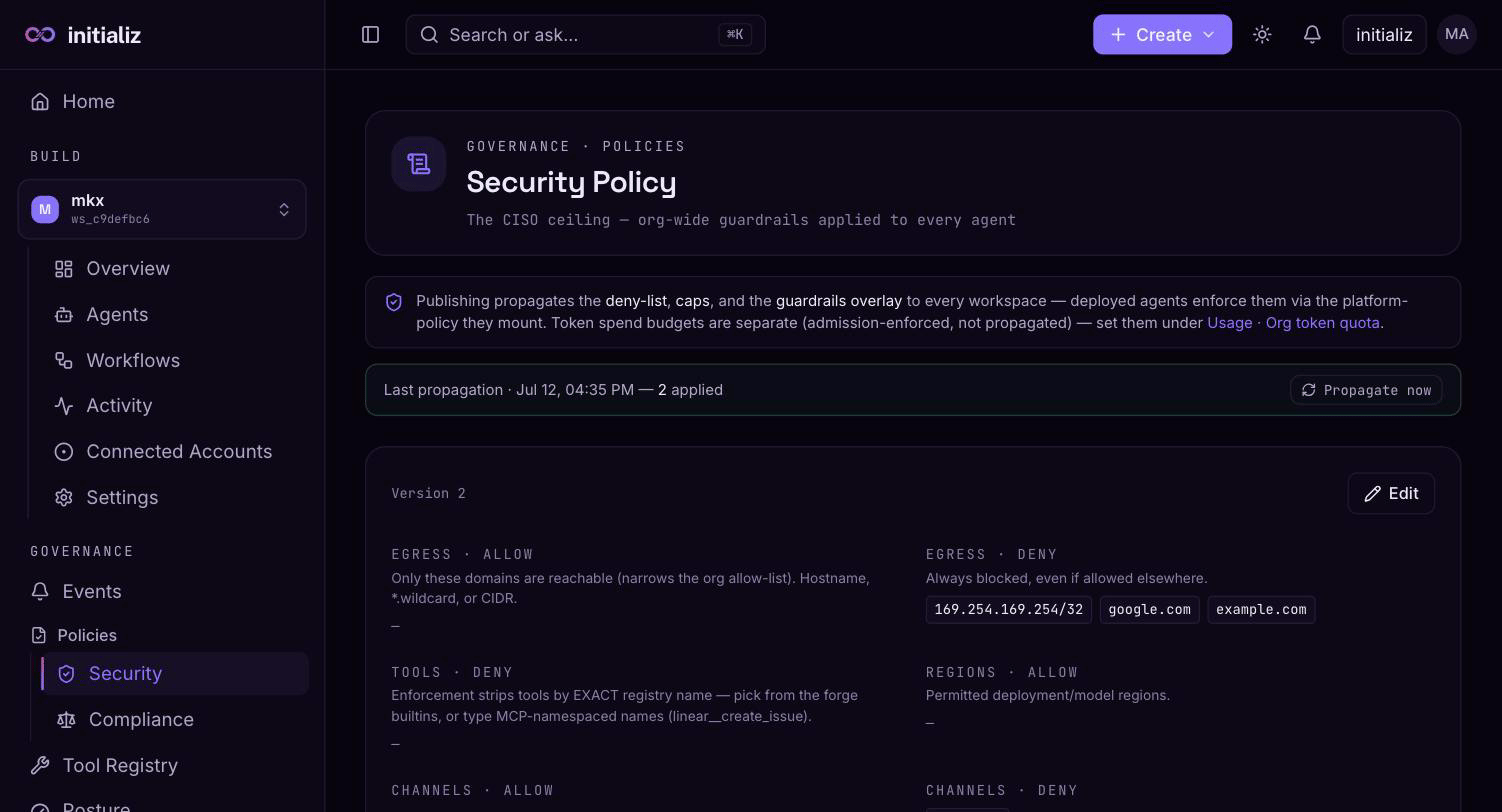
A policy document has four blocks:
| Block | Contents | Combination rule across layers |
|---|---|---|
| Deny list | Egress domains, tools, models (provider + name), channels, and denied command patterns | Union — any layer can forbid |
| Allow list | Egress domains, models, channels, regions | Intersection — every non-empty layer must permit |
| Required | Guardrails (each with a mode of block, redact, or log_only and a fail mode) plus a structured guardrails overlay (PII, moderation, security detection, custom rules, approval gates) | Union with mandatory injection — agents cannot decline a required guardrail |
| Limits | max_egress_allowlist_size, max_tool_count, max_concurrent_invocations | Smallest non-zero value wins; zero means no cap at that layer |
Two details worth calling out:
- Denied command patterns block shell commands across every tool call in an invocation. Each entry is a regular expression with an optional operator-facing deny message. Patterns are validated when you publish, because the agent runtime fails closed on a bad pattern — an invalid regex would stop agents from starting.
- Required guardrails are forced to fail-closed when required by org or workspace policy, regardless of what the agent declares — required behavior must not silently degrade.
An empty allow list at a layer means "no restriction from this layer", not "allow nothing" — the intersection then falls through to the next layer that does restrict.
The effective policy
What an agent actually enforces is the effective policy: the org policy and the workspace policy (and the agent's own declaration, where one exists) resolved with the four combination rules above. The console shows the effective view with origin tags on every entry — each deny entry, required guardrail, and binding limit records which layer(s) put it there ("this rule is here because of org policy"), so you never have to mentally re-run the resolver. For denied command patterns, when the same pattern appears at more than one layer, the org-level deny message takes precedence.
Versions, history, and rollback
Publishing a policy is versioned:
- Every publish increments the policy's version counter and stores an immutable snapshot of the previous state.
- An audit trail records who changed what and when — actor, action (create, update, rollback), from-version, to-version, and a diff summary.
- You can diff any two versions and roll back to an earlier version; rollback is itself a new published version with its own audit entry.
Who can edit
| Policy scope | Who can publish |
|---|---|
| Org policy | Org admin only |
| Workspace policy | Workspace admin of that workspace, or an org admin |
Everyone else sees policies read-only. The console enforces this in the editor (the Edit control only appears for eligible roles) and the platform enforces it again on every write, so the console gate is a convenience, not the security boundary. One carve-out: the trust-mode floors portion of the org policy is authorable by security admins as well as org admins — it is the security persona's dedicated surface.
The org policy is edited under Governance → Policies → Security; workspace policies are edited in each workspace's settings. The editor starts read-only — enter edit mode, make changes, and publish. Policy templates are available as starting points.
Two-person change control
For organizations that require separation of duties over policy edits, the platform API supports routing an org-policy change through a propose → approve flow instead of a direct edit:
- An author proposes a change. Nothing is applied — the proposal records the intended change and a diff summary, and waits.
- A different person approves it (the platform rejects self-approval), and only then is the change applied — through the same path as a direct edit, so approved changes share the same version trail, history, and rollback as everything else. A proposal can also be rejected.
- Proposing a change to the security ceiling requires org-admin authority, just as directly editing it does; approving or rejecting any proposal is org-admin-only.
The flow is additive — direct edits keep working for orgs that don't need
it — and every step is auditable in the
event stream as policy_change_proposed,
policy_change_approved, and policy_change_rejected, carrying the author,
the approver, and the from/to policy versions.
How changes reach running agents
Publishing a policy propagates the compiled deny lists, caps (egress-allowlist size and tool count), and the required-guardrails overlay to every workspace. Deployed agents enforce the propagated policy through the platform policy their runtime loads — you do not redeploy agents to pick up a deny-list change.
Propagation is asynchronous: after publishing, the Policies screen shows a propagation status banner tracking the rollout across workspaces, so you can confirm the new version has landed everywhere before relying on it.
Not everything travels on that path:
- Allow lists and the concurrency limit are enforced when agents are
configured, built, and deployed — build-time policy checks reject
configurations that violate them and emit
policy_violation_at_build_timeevents into the event stream. - Token spend budgets are separate from policy: they are enforced at task admission, not propagated, and are managed under Usage and quotas.
- Compliance rules are separate as well: the platform evaluates them live on every governed tool call, so a published compliance change applies to the very next call with no propagation step — see Compliance and tool-call decisions.
Because deny entries propagate to running agents while allow lists apply at build and deploy time, a newly added deny rule takes effect quickly across the fleet, but a loosened allow list only benefits agents at their next build or deploy.
Security events
The audit event stream emitted by every agent and workflow, event naming conventions, the full event-type inventory, and the Events screen.
Compliance and tool-call decisions
Value-level governance of tool calls — compliance rules that allow, defer for approval, or deny each call over its actual argument values, with an org baseline and per-agent tightening.