
Security events
The audit event stream emitted by every agent and workflow, event naming conventions, the full event-type inventory, and the Events screen.
Every deployed agent emits audit events as it runs: session lifecycle, tool executions, network egress decisions, LLM calls, guardrail checks, and quota denials. Workflow executions emit their own lifecycle events alongside the events of every agent they dispatch. Build-time policy checks emit events too, so a policy violation caught before deployment shows up in the same stream as one caught at runtime. All of it lands in one unified event store with one query path — the Events screen under Governance → Events.
Anatomy of an event
Every event carries a common envelope plus an event-type-specific payload:
event_type— what happened, named<entity>_<verb>(see below).tsand a producerseq— emit time plus a per-producer sequence number. Timelines order by wall-clock time and useseqto break ties within the same second.- Identity and correlation — org, workspace, the emitting entity
(
entity_typeofagent,workflow, orassistantplusentity_id), the invocation (one agent task) and, for workflow runs, the execution that groups every agent's events for the run. outcome— one ofok,allowed,denied,blocked,masked,modified,cancelled,error,pending, orinfo. Lifecycle events that carry no allow/deny semantic resolve toinfo; events that represent an open gate awaiting a human (a consent request, a waiting workflow step) resolve topending.severity—info,warning,blocking, orcritical.fields— the event-type-specific detail (for example, anllm_callcarries model, provider, and token counts; anegress_blockedcarries the blocked domain and the rule that matched).
Event naming
Event types follow the <entity>_<verb> convention: the prefix names the
entity or gate, the verb names what happened. Examples: tool_exec,
egress_blocked, guardrail_check, workflow_started,
task_admission_denied. The
prefix is meaningful — it encodes the altitude of the gate. task_admission_denied
is a per-task admission decision, distinct from the per-tool-call
tool_call_decided and per-LLM-call gates that sit alongside it. The
runtime's vocabulary grows over time; the platform accepts and stores
well-formed new types, and the console falls back to the raw type name as the
label until a friendly one exists.
Notable event types
The registered event types, by family:
| Event type | Meaning |
|---|---|
session_start / session_end | An agent session opened / closed. |
invocation_complete / invocation_cancelled | An agent task finished / was cancelled. |
tool_exec | A tool call started or returned (start and end phases). |
llm_call | A model call returned. Carries model, provider, and input/output token counts. |
llm_call_cancelled | A model call was cancelled before it returned. |
llm_call_failed | The model provider or gateway errored or rejected the call; fields.error carries the detail. |
schedule_fire | A configured schedule triggered an agent run. |
schedule_complete | A scheduled run finished; fields.success distinguishes success from failure. |
schedule_skip | A scheduled run was skipped. |
schedule_modify | An agent's schedule was changed. |
mcp_server_started | A connected tool server started for the agent (metadata only — names, sizes, durations). |
mcp_server_degraded / mcp_server_failed | A connected tool server degraded / failed. |
mcp_tool_call / mcp_tool_result | A call to a connected tool server / its result (fields.ok marks a failed result). |
mcp_tool_conflict | A tool was dropped — it failed construction or its name conflicted with another registered tool. |
mcp_token_refresh | A short-lived access token for a tool connection was refreshed. |
mcp_auth_required | A tool call parked because the user has not connected their own account for a delegated tool (outcome pending — see Approvals and consents). |
mcp_auth_resolved | The consent gate resolved — the user connected (or explicitly declined) and the parked call proceeded or was refused. |
mcp_auth_timeout | The consent gate expired before the user connected. |
egress_allowed / egress_blocked | An outbound network request was permitted / denied by the egress policy. |
guardrail_check | A guardrail evaluated content; the decision (allowed, masked, blocked) becomes the outcome. |
channel_denied_by_policy | A channel was refused by the effective policy. |
policy_violation_at_build_time | A build-time policy check (egress, tools, channels) rejected an agent configuration. |
policy_loaded | The agent loaded its platform policy at startup (informational). |
task_admission_denied | A task was refused by a token quota. Fields carry scope, window, reason, reset_at, and cached (whether the deny was replayed from the runtime's local cache). |
tool_call_decided | The platform decided a proposed tool call — allow, defer, or deny over the actual argument values. Every verdict is recorded, and each carries the invocation it belongs to, so it groups into the invocation timeline alongside the agent's own enforcement events rather than floating unattributed. See Compliance and tool-call decisions. |
pdp_decision | The agent-side enforcement record of the same tool-call decision, emitted by the runtime as it enforces the verdict. |
task_deferred | A governed tool call was parked awaiting a human approve/deny. |
task_deferred_decision | An approver decided a parked call (approve or reject). |
task_deferred_timeout | A parked call expired before anyone decided it. |
approval_requested | A workflow approval gate parked the run awaiting a human decision (outcome pending). Fields carry the approvers and the timeout deadline. |
approval_granted | An approver approved the parked workflow gate; the run resumes. Carries the verified approver email and any comment. |
approval_rejected | An approver rejected the gate (outcome denied). |
approval_timeout | The gate expired undecided; the outcome follows the gate's configured on-timeout policy (auto-approve or reject). |
auth_verify / auth_fail | Inbound agent authentication succeeded / failed. |
auth_step_up_required | A step-up authentication demand was raised. |
credential_issued / credential_revoked / credential_failed | Credential lifecycle (metadata only — never the credential material). |
intent_alignment / intent_drift | Intent alignment checks and detected drift. |
context_compressed / context_expanded / context_pattern_suggested | Context-compression telemetry, including tokens saved per compression. |
agent_card_published / audit_export_status | Runtime lifecycle and audit-sink health (informational). |
workflow_started / workflow_step_started / workflow_step_completed / workflow_step_failed / workflow_complete / workflow_cancelled | Workflow execution lifecycle, emitted with entity_type workflow. |
workflow_step_waiting | A workflow step paused awaiting a user — for example, a pending account-connection consent (outcome pending). |
workflow_branch_taken | A workflow switch node took a branch — records the input evaluated, the case that matched (or the default), and the next node. Routing, not a success/denial decision (outcome info). |
admin_killed | The agent-side kill switch tripped: the runtime received a kill signal, cancelled its in-flight work, and disabled itself. Fields carry the caller, the reason, and what was cancelled; each cancelled invocation also emits its own invocation_cancelled with reason kill_switch. Outcome blocked. |
agent_killed | An operator killed an agent from the console — the control plane cancelled active work and scaled the workload to zero. Fields carry the acting operator, the reason, whether the graceful cancel succeeded, the cancelled count, and the replica count before the kill. Outcome blocked. |
agent_kill_restored | A killed agent was resumed — scaled back to its pre-kill replicas and re-registered for dispatch. |
policy_change_proposed | An org-policy change was proposed for two-person approval (outcome info — nothing is applied yet). Fields carry the author and a diff summary. |
policy_change_approved | A different approver applied a proposed org-policy change. Fields carry author, approver, and the from/to policy versions. |
policy_change_rejected | A proposed org-policy change was rejected (outcome blocked). |
principal_revoked | The organization's identity provider signaled (via a Shared Signals / security-event token) that a human principal was disabled or their sessions revoked; the platform recorded it and now refuses that principal's delegated authority. |
The workflow approval gate events (approval_*) record human decision points
authored inside workflows — see
Running and monitoring workflows for
how those gates behave at run time.
By default the Events screen filters to the security-relevant subset —
egress_blocked, policy_violation_at_build_time, channel_denied_by_policy,
guardrail_check, auth_fail, task_admission_denied, tool_call_decided,
pdp_decision, mcp_auth_required, mcp_auth_timeout, the kill-switch
events (admin_killed, agent_killed — the restore is excluded, like other
positive lifecycle events), the policy change-control events
(policy_change_proposed / _approved / _rejected), and
principal_revoked — so you see enforcement signal rather than the full
operational firehose. The filter is adjustable when you need the rest.
The Events screen
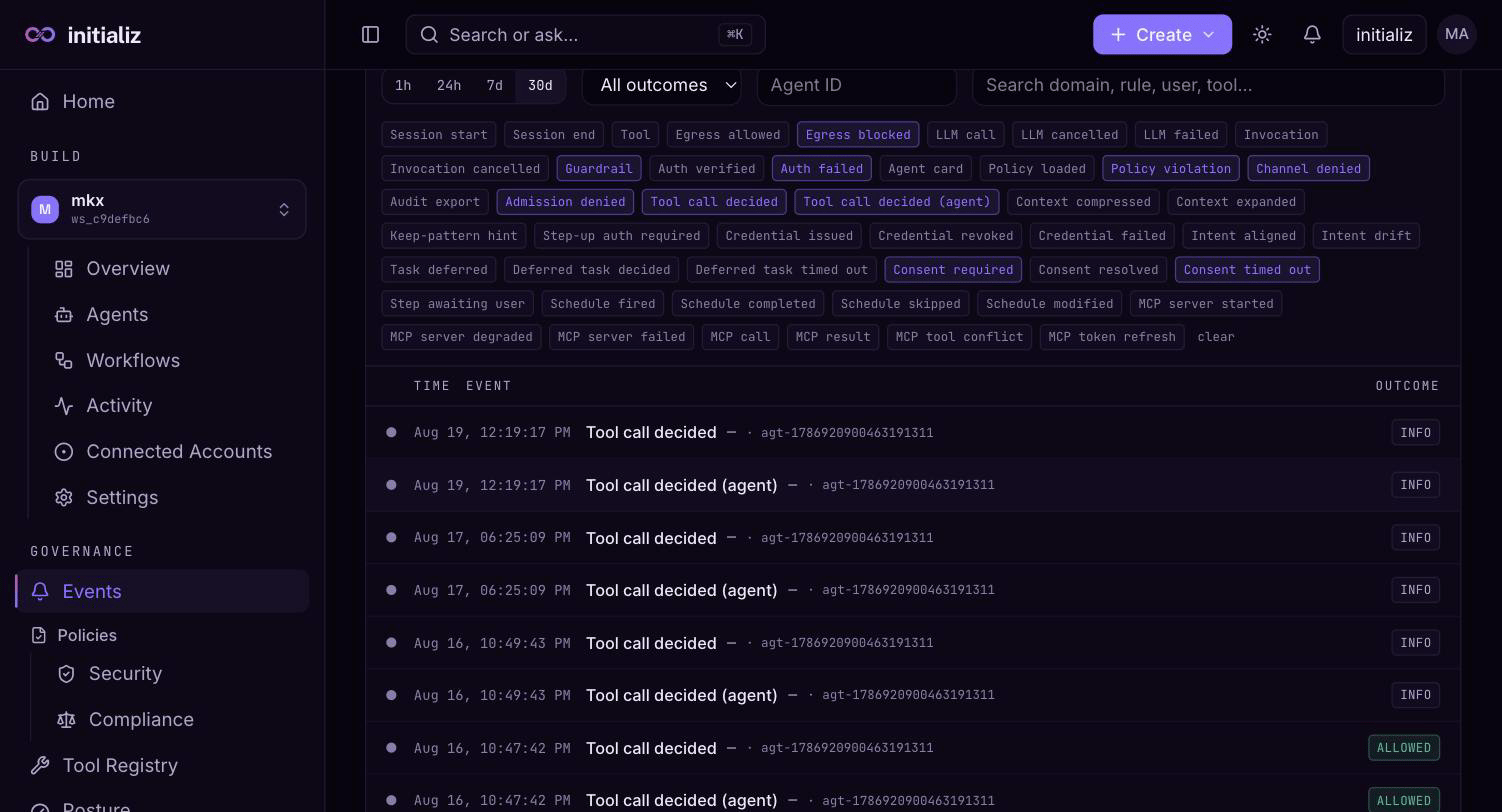
Governance → Events shows the stream scoped to your selected workspaces, defaulting to the last 24 hours and the security-relevant event types.
- Filtering — by event type, outcome, agent, time range, and workspace scope. A search box matches rule keys, domains, and tool names — this is also where deep links from the Posture screen land, pre-seeded with the rule you clicked.
- Spike detection — a banner flags time buckets where event volume spikes well above baseline, so bursts of denials stand out before you scroll.
- One event, one row — every event renders as its own row, never collapsed behind a summary; filters and search are how you manage volume. To read a whole run as a unit, pivot to its invocation or execution timeline (below).
- Event detail — selecting a row opens a drawer with the full envelope and the event-type-specific fields, including the decision that was made and the policy attribution behind it. The emitting agent is shown by name — resolved across every workspace in your current scope — and links straight to the agent's detail page. When the agent has payload capture enabled, a View formatted button opens the captured prompt, completion, or tool arguments/result in a readable modal instead of raw JSON; the raw fields remain available at the bottom of the drawer.
Pivoting to a full run
From any event you can pivot to everything correlated with it:
- Invocation timeline — every event from one agent invocation, in order.
- Execution timeline — every event from every agent in one workflow execution, ordered by wall-clock time with the producer sequence breaking ties within the same second. This is the investigator's pivot from a single suspicious event to "what else happened in that run" without leaving the governance console.
The same event stream also powers the Activity tab on each agent's detail page, so builders and security reviewers look at the same records.
Evidence export and governance reports
For auditors, the platform API can export a scoped evidence bundle: every event in a time range (optionally narrowed further), hash-chained so tampering is detectable, and deliberately org-complete — evidence ignores workspace scoping because completeness is the point. An over-large range is rejected rather than silently truncated (narrow the window and export again), and every export is itself recorded in an append-only export manifest, so the act of exporting evidence leaves its own trail. Exporting requires org-level compliance authority.
Two governance reports run over the same stream via the platform API:
- Actor breakdown — governed actions split by what performed them (agent vs. human), for the "what fraction of our actions are agentic?" question.
- Foreign agents — detection-only: actions that reached governed resources without a platform-issued call-chain credential.
Both default to the last seven days and accept an explicit time range.
Security
Governance for every agent and workflow — audit events, security and compliance policies, tool-call decisions, approvals, posture, and usage quotas.
Policies
Org-level and workspace-level security policies, the effective policy resolution, versions and rollback, and how changes reach running agents.