How To Build RAG Application
RAG applications combine information retrieval with generative AI to provide intelligent responses based on a knowledge base. This guide walks you through the process of creating a RAG application using the initializ.ai platform.
Transforming PDFs into Knowledge: Our Application Idea
We are building an innovative Retrieval-Augmented Generation (RAG) application that transforms how users interact with PDF documents. With the power of AI, our app allows users to upload a PDF, ask questions related to its content, and receive precise, context-aware responses.
Whether it’s extracting insights from a research paper, finding critical data in a report, or simply navigating a manual with ease, our solution makes static documents dynamic, empowering users with immediate access to the knowledge they need.
Prerequisites
- Set up a database capable of storing embeddings.
- Embedding model.
- LLM model.
Visualizing the Flow

Step-by-step process
STEP 01: Setup a database
- Log in to the initializ.ai platform.
- Navigate to the Database section.
- Create a PostgreSQL database with the pgvector extension pre-installed on our Initializ.ai platform, allowing you to store embeddings efficiently.(How to create database)
- Once database get active you can connect to your database using PGAdmin.
STEP 02: Deploy Embedding Model
As the one-stop solution, you can deploy your embedding model on initializ.ai. Simply log in to the Initializ.ai platform to get started.
-
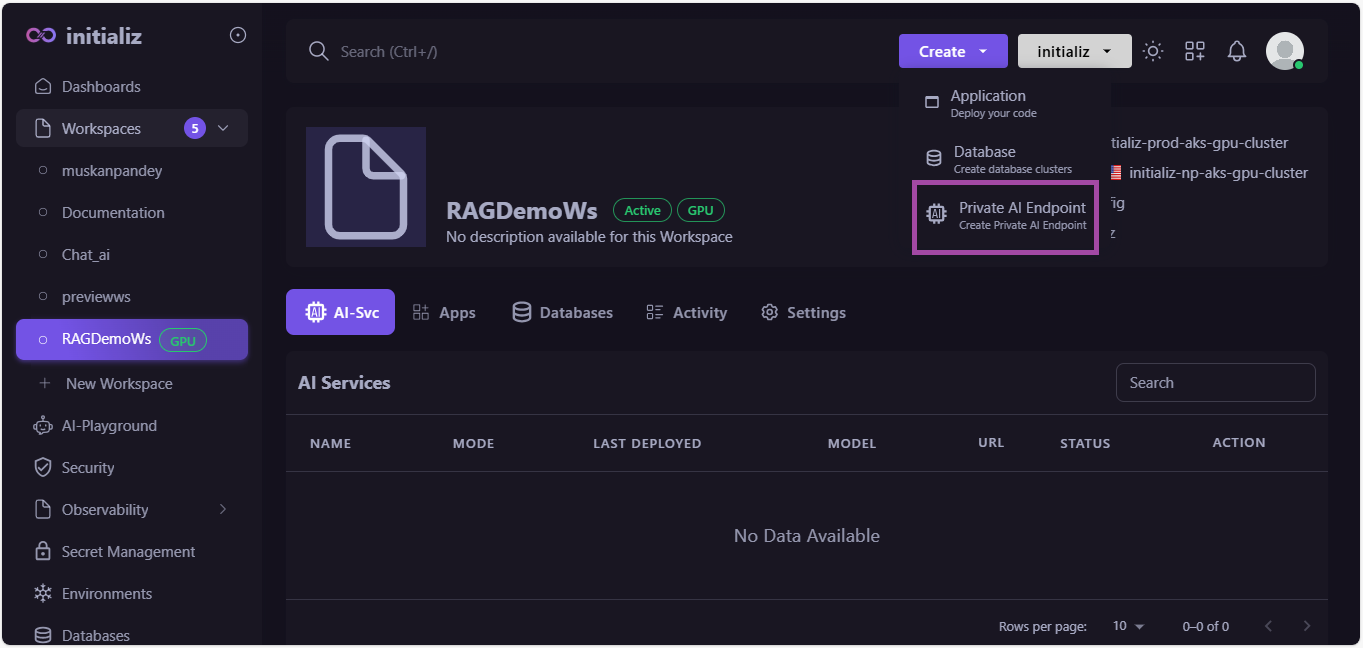
Create an AI Endpoint by selecting the model sentence-transformers/all-MiniLM-L6-v2. To create an AI Endpoint, you need a GPU-enabled workspace.
-
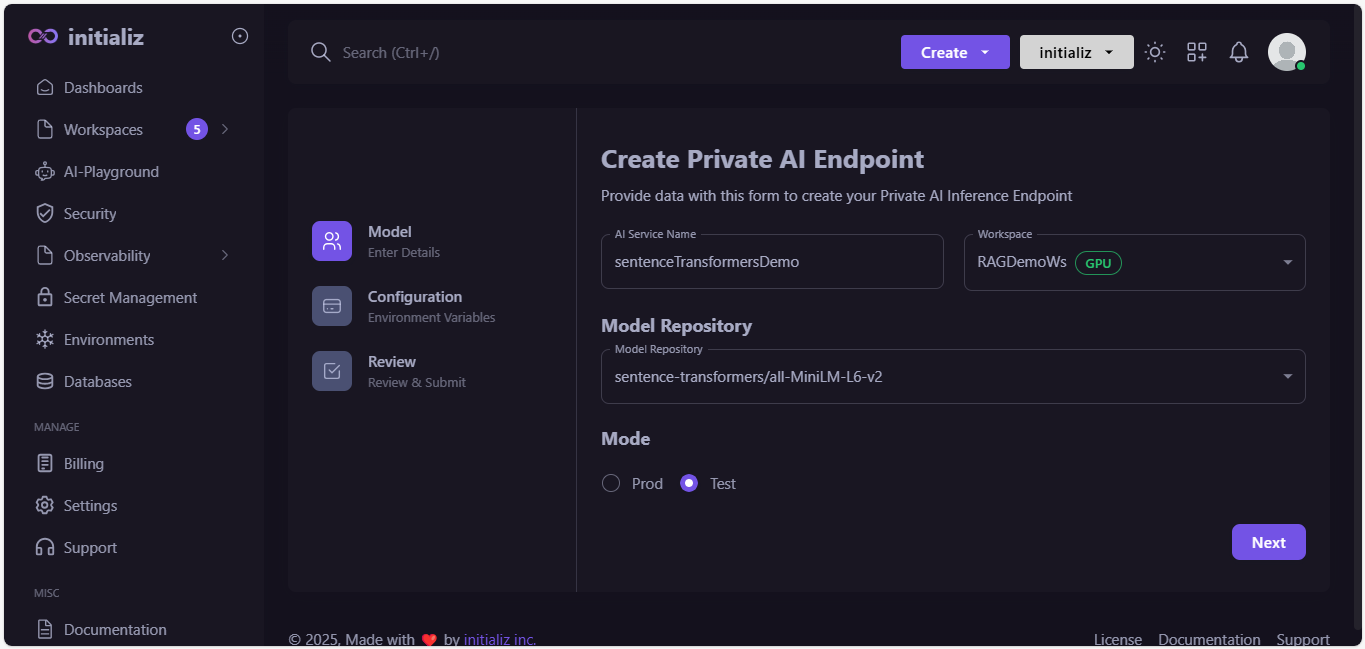
Fill out the details.
-
Configure AI Endpoint, and click on "Next".

-
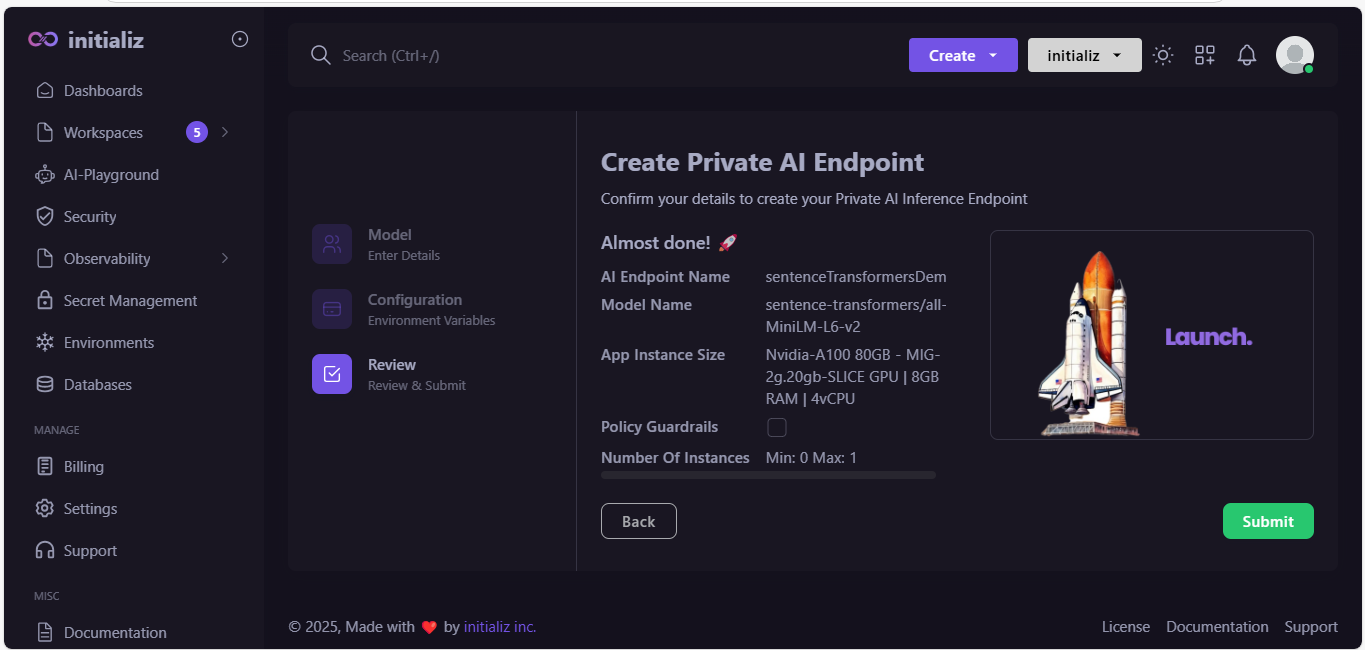
Review all your details and click on "Submit".
-
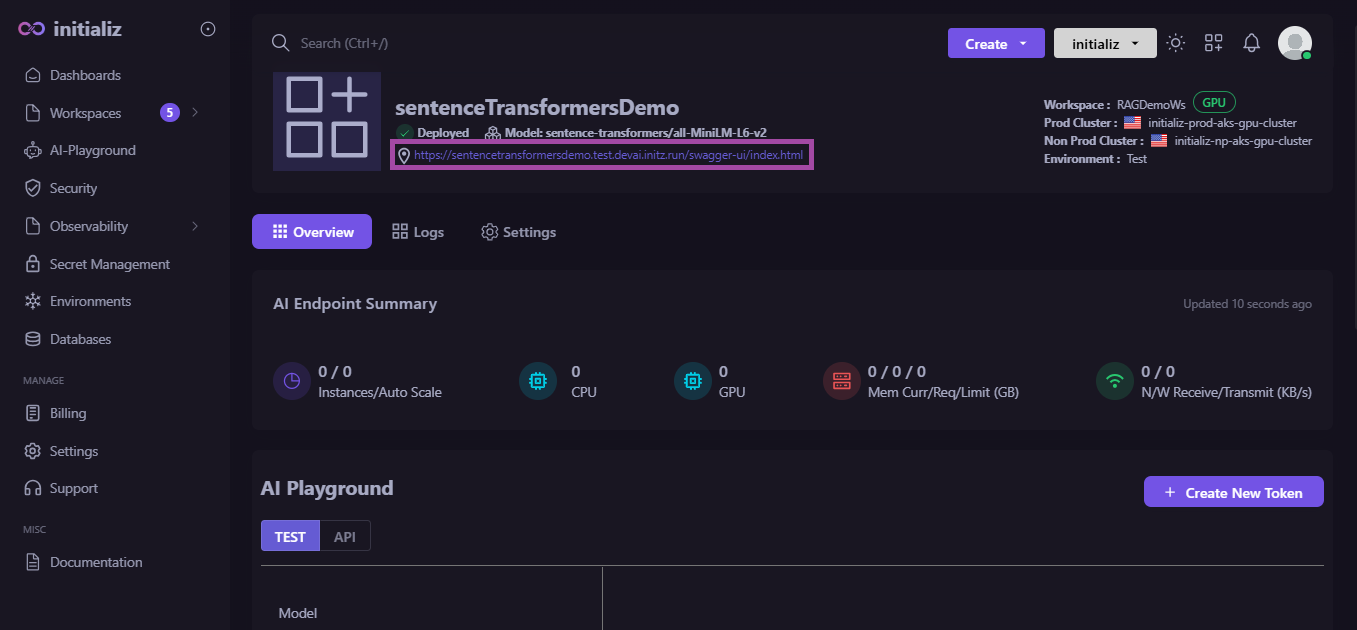
Once the model is deployed, you will receive an endpoint (URL). This URL corresponds to a Swagger interface. By opening the Swagger interface, you can view the endpoint details. Using this endpoint URL, you can send your data chunks, and it will return embeddings in the response.
STEP 03: Deploy LLM Model
To deploy an LLM model, you need to follow the same steps as you would when deploying an embedding model. The only difference is that instead of using sentence-transformers/all-MiniLM-L6-v2, you can select any LLM model of your choice and deploy it.
Once the LLM model is deployed, you will receive a Swagger URL. By accessing this interface, you can retrieve the endpoint to make requests.
STEP 04: Let's create an endpoint for the RAG application
We will implement an endpoint using Python. Start by creating a folder for your project, and then create a file named app.py, where you will write the code for the endpoint.
-
STEP 04.01: Necessary Dependencies
First, let’s import the necessary dependencies in app.py.
Necessary Dependencies
from flask import Flask, request, jsonify, Response
import os
import json
from PIL import Image, ImageEnhance
import fitz  # PyMuPDF, fitz allows you to extract text, images, and other content from PDF files
import requests
import io
import psycopg
from langchain.text_splitter import CharacterTextSplitter
from pgvector.psycopg import register_vector
from flask_cors import CORS
import numpy as np
from dotenv import load_dotenv -
STEP 04.02: Initialize Flask app
Flask is a micro web framework in Python that allows you to build web applications, APIs, or dynamic websites. It provides the tools and features needed to handle HTTP requests, render templates, and more.
app = Flask(__name__) -
STEP 04.03: Create .env file
Create a .env file in the root of your project, and include all environment variables such as the database hostname, password, embedding model URL, and LLM model URL inside it.
.env file
.envDB_HOST=xyzdb.test.xyzorg.db.psi.initz.run
DB_PORT=5432
DB_NAME=xyzdb
DB_USER=xyzdb
DB_PASSWORD=bqdhkFShqH8lKL
MODEL_URL=<put your LLM model end point>
EMBEDDING_MODEL_URL=<Put your EMBEDDING_MODEL url>
EMBEDDING_MODEL=sentence-transformers/all-MiniLM-L6-v2
TOKEN=<Put your token> -
STEP 04.04: CORS setup
The line is typically used in a Flask application to enable Cross-Origin Resource Sharing (CORS).
CORS(app, resources={r"/*": {"origins": "*"}}) -
STEP 04.05: Loding environment variables
The load_dotenv() function loads environment variables from .env file into your application's environment. It is provided by the python-dotenv library.
Environment Variables
# Load environment variables from a .env file
load_dotenv()

# Load the environment variable for the model URL
MODEL_URL = os.getenv("MODEL_URL")

# Load the environment variable for the authentication token
TOKEN = os.getenv("TOKEN")

# Load the environment variable for the embedding model URL
EMBEDDING_MODEL_URL = os.getenv("EMBEDDING_MODEL_URL")

# Load the environment variable for the embedding model name
EMBEDDING_MODEL = os.getenv("EMBEDDING_MODEL")

# Load environment variables for the database configuration
DB_CONFIG = {
   "host": os.getenv("DB_HOST"),        # Database host
   "port": os.getenv("DB_PORT"),        # Database port
   "dbname": os.getenv("DB_NAME"),      # Database name
   "user": os.getenv("DB_USER"),        # Database user
   "password": os.getenv("DB_PASSWORD"), # Database password
} -
STEP 04.06: Set Up database connection
Database connection setup
# PostgreSQL connection setup
def get_db_connection():
   try:
      # Connect to the database using psycopg
      conn = psycopg.connect(
            host=DB_CONFIG["host"],
            port=DB_CONFIG["port"],
            dbname=DB_CONFIG["dbname"],
            user=DB_CONFIG["user"],
            password=DB_CONFIG["password"]
      )
      return conn
   except Exception as e:
print(f"Error connecting to the database: {e}") -
STEP 04.07: Run the Flask app
The line app.run(debug=False, host="0.0.0.0", port=8000) is used to start a Flask application, and the arguments specify how the Flask development server behaves.
Run the Flask app
# Run the Flask app
if __name__ == '__main__':
   # connects database
   conn = get_db_connection()
   # It instructs PostgreSQL to create an extension called "vector" if it does not already exist in the database.
   conn.execute('CREATE EXTENSION IF NOT EXISTS vector')
   # ensures pgvector extension is installed and available in the PostgreSQL database.
   create_pgvector_extension()
   # creates a vector table in PostgreSQL
   create_document_vectors_table()
   register_vector(conn)
app.run(debug=False, host="0.0.0.0", port=8000) -
STEP 04.08: Let's implement the helper functions
create_pgvector_extension()
# ensures pgvector extension is installed and available in the PostgreSQL database.

def create_pgvector_extension():
   # connects database
   conn = get_db_connection()
   #executes SQL queries, retrieve results, and manage transactions.
   cursor = conn.cursor()

   cursor.execute("CREATE EXTENSION IF NOT EXISTS vector;")
   # to save changes made to the database during the current transaction
   conn.commit()

   cursor.close()
   conn.close()
create_document_vectors_table()
# creates a vector table in PostgreSQL
def create_document_vectors_table():
   conn = get_db_connection()
   # with get_db_connection() as conn:
   cursor = conn.cursor()

   create_table_query = """
   CREATE TABLE IF NOT EXISTS document_vectors (
      id SERIAL PRIMARY KEY,
      document_name TEXT NOT NULL,
      chunk TEXT NOT NULL,
      embedding VECTOR(1536)
   );
   """
   cursor.execute(create_table_query)
   conn.commit()

   cursor.close()
   conn.close()
Route to upload multiple PDFs and ask questions
The line @app.route('/upload_pdf_and_ask', methods=['POST']) is a Flask route decorator that maps a specific URL (in this case,/upload_pdf_and_ask) to a function that handles requests sent to that URL.
@app.route('/upload_pdf_and_ask', methods=['POST'])
def upload_pdf_and_ask():
   if 'file' not in request.files:
      return jsonify({"error": "Missing files"}), 400

   files = request.files.getlist('file')
   question = request.form.get("question")
   if not question:
      return jsonify({"error": "Missing question"}), 400
   streaming = request.form.get("stream") == 'true'

   for file in files:
      file_path = os.path.join('uploads', file.filename)
      os.makedirs('uploads', exist_ok=True)
      file.save(file_path) #saves the input file to the local storage

      # custom function to extract the text from the input file
      text = extract_text_from_pdf(file_path)

      chunks = split_text_into_chunks(text, max_chunk_size=512)


      for chunk in chunks:
            # convert these chunks into embeddings
            embeddings = get_embeddings(chunk)

            # add embeddings into database
            add_to_pgvector(embeddings, chunk, file.filename)


   # creates embeddings of question
   question_embedding = get_embeddings(question)

   # search for the best possible match for the question
   search_results = search_pgvector(question_embedding)

   # removes the file from the local storage
   for file in files:
      file_path = os.path.join('uploads', file.filename)
      if os.path.exists(file_path):
            os.remove(file_path)

   # Prepare response context
   if search_results:
      best_match = search_results[0][1]
      matched_document = search_results[0][0]
   else:
      best_match = "No relevant match found."
      matched_document = "Unknown"

   max_tokens = 4096
   context = best_match[:max_tokens]

   # Prepare system and user messages for the model
   system_message = "You are a helpful assistant that answers questions to the point based on the provided documents.. Please limit your answer to 200 words."
   user_message = f"Question: {question}\nContext: {context}"

   for file in files:
      delete_from_pgvector(file.filename)

   if streaming:
      return Response(event_generator(system_message, user_message, TOKEN, streaming=True),
                        content_type='text/event-stream;charset=utf-8', status=200 )
   else:
      return Response(event_generator(system_message, user_message, TOKEN, streaming=False),
                        content_type='application/json', status=200 )
delete_from_pgvector(file.filename)
# Delete from pgvector
def delete_from_pgvector(source):
   conn = get_db_connection()
   cursor = conn.cursor()

   delete_query = """
   DELETE FROM document_vectors
   WHERE document_name = %s;
   """
   cursor.execute(delete_query, (source,))
   conn.commit()

   cursor.close()
extract_text_from_pdf(pdf_path)
# Helper function to extract text from PDF
def extract_text_from_pdf(pdf_path):
   doc = fitz.open(pdf_path)
   full_text = ""
   for page_num in range(doc.page_count):
      page = doc.load_page(page_num)
      page_text = page.get_text()


      if page_text.strip():
         full_text += page_text
   return full_text
split_text_into_chunks(text, max_chunk_size=512)
# Function to split text into smaller chunks using Langchain's splitter
def split_text_into_chunks(text, max_chunk_size=512):

# Initialize the text splitter with a chunk size of 512 characters
text_splitter = CharacterTextSplitter(chunk_size=max_chunk_size, chunk_overlap=100)

#split a large text into smaller, manageable chunks based on the settings defined in the text_splitter
chunks = text_splitter.split_text(text)
return chunks
get_embeddings(text)
# Helper function to get embeddings for a given text
def get_embeddings(text):
   headers = {
      "accept": "application/json",
      "Content-Type": "application/json"
   }
   payload = {
      "model": EMBEDDING_MODEL,
      "input": [text],
      "encoding_format": "float",
      "truncate_prompt_tokens": 1,
      "add_special_tokens": False,
      "priority": 0
   }

   response = requests.post(EMBEDDING_MODEL_URL, json=payload, headers=headers)

   if response.status_code == 200:
      response_data = response.json()
      embedding = response_data.get("data", [])[0].get("embedding", [])

      if isinstance(embedding, list):
            adjusted_embeddings = adjust_embedding_size(embedding, desired_size=1536)
            return adjusted_embeddings
      else:
            raise TypeError("Embedding response should be a list of floats.")
   else:
      raise Exception(f"Failed to get embeddings: {response.status_code} - {response.text}")
adjust_embedding_size(embedding, desired_size=1536)
def adjust_embedding_size(embedding, desired_size=1536):
   if not isinstance(embedding, list):
      raise TypeError("Expected 'embedding' to be a list.")
   if len(embedding) > desired_size:
      embedding = embedding[:desired_size]
   elif len(embedding) < desired_size:
      embedding = np.pad(embedding, (0, desired_size - len(embedding)), 'constant')
   return embedding
add_to_pgvector(embeddings, text_chunk, source)
# Function to add embeddings to PostgreSQL using pgvector
def add_to_pgvector(embeddings, text_chunk, source):
   conn = get_db_connection()
   cursor = conn.cursor()
   if isinstance(embeddings, np.ndarray) and embeddings.ndim == 1:
      embedding_vector = embeddings.tolist()

   else:
      raise TypeError("Expected embeddings[0] to be a list or array, but got: {}".format(type(embeddings[0])))

   insert_query = """
   INSERT INTO document_vectors (document_name, chunk, embedding)
   VALUES (%s, %s, %s);  -- No casting in query
   """

   # Execute the insert query
   cursor.execute(insert_query, (source, text_chunk, embedding_vector))
   conn.commit()

   cursor.close()
   conn.close()
search_pgvector(query_embedding, top_k=5)
# Function to search PGVector
def search_pgvector(query_embedding, top_k=5):
   if isinstance(query_embedding, np.ndarray):
      query_vector = query_embedding.tolist()
   else:
      raise TypeError(f"Expected query_embedding to be a numpy array, but got: {type(query_embedding)}")

   conn = get_db_connection()
   cursor = conn.cursor()

   search_query = """
   SELECT document_name, chunk, embedding
   FROM document_vectors
   ORDER BY embedding <=> %s::vector(1536)
   LIMIT %s;
   """

   # Execute the query with the proper casting of query_vector
   cursor.execute(search_query, (query_vector, top_k))
   results = cursor.fetchall()

   cursor.close()
   conn.close()

   return results
def event_generator(system_message, user_message, token, streaming)
# Event stream generator
def event_generator(system_message, user_message, token, streaming):
   """This generator handles the event stream and yields data."""
   try:
      for chunk in get_custom_model_answer(system_message, user_message, token, streaming):
            yield f"{chunk}\n\n"
   except Exception as e:
      yield f"data: Error - {str(e)}\n\n"
get_custom_model_answer(system_message, user_message, token, streaming)
# Function to get the response from the model API
def get_custom_model_answer(system_message, user_message, token, streaming):
   headers = {
      'Content-Type': 'application/json',
      'Authorization': f'Bearer {token}'
   }

   def sanitize_input(input_text):
      return input_text.encode('utf-8', 'ignore').decode('utf-8', 'ignore')

   system_message = sanitize_input(system_message)
   user_message = sanitize_input(user_message)

   try:
      payload = {
            "model": "meta-llama/Meta-Llama-3.1-8B-Instruct",
            "messages": [
               {"role": "system", "content": system_message},
               {"role": "user", "content": user_message}
            ],
            "max_tokens": 5000,
            "temperature": 0.7,
            "stream": streaming
      }
      response = requests.post(MODEL_URL, headers=headers, data=json.dumps(payload), stream=True)
      if response.status_code != 200:
            print(f"Error Response: {response.text}")
            return f"Error: {response.status_code}, {response.text}"

      # Yield chunks if response is streamed
      for chunk in response.iter_lines():
            if chunk:
               yield chunk.decode('utf-8')

   except requests.exceptions.RequestException as e:
      print(f"Error while making the API call: {e}")
      return f"Error: {e}"
Complete Code Implementation
app.pyfrom flask import Flask, request, jsonify, Response
import os
import json
from PIL import Image, ImageEnhance
import fitz # PyMuPDF, fitz allows you to extract text, images, and other content from PDF files
import requests
import io
import psycopg
from langchain.text_splitter import CharacterTextSplitter
from pgvector.psycopg import register_vector
from flask_cors import CORS
import numpy as np
from dotenv import load_dotenv
app = Flask(__name__)
# Load environment variables from a .env file
load_dotenv()
# enables cross-origin resource sharing
CORS(app, resources={r"/*": {"origins": "*"}})
# Load the environment variable for the model URL
MODEL_URL = os.getenv("MODEL_URL")
# Load the environment variable for the authentication token
TOKEN = os.getenv("TOKEN")
# Load the environment variable for the embedding model URL
EMBEDDING_MODEL_URL = os.getenv("EMBEDDING_MODEL_URL")
# Load the environment variable for the embedding model name
EMBEDDING_MODEL = os.getenv("EMBEDDING_MODEL")
# Load environment variables for the database configuration
DB_CONFIG = {
"host": os.getenv("DB_HOST"), # Database host
"port": os.getenv("DB_PORT"), # Database port
"dbname": os.getenv("DB_NAME"), # Database name
"user": os.getenv("DB_USER"), # Database user
"password": os.getenv("DB_PASSWORD"), # Database password
}
CORS(app, resources={r"/*": {"origins": "*"}})
# PostgreSQL connection setup
def get_db_connection():
try:
# Connect to the database using psycopg
conn = psycopg.connect(
host=DB_CONFIG["host"],
port=DB_CONFIG["port"],
dbname=DB_CONFIG["dbname"],
user=DB_CONFIG["user"],
password=DB_CONFIG["password"]
)
return conn
except Exception as e:
print(f"Error connecting to the database: {e}")
# ensures pgvector extension is installed and available in the PostgreSQL database.
def create_pgvector_extension():
# connects database
conn = get_db_connection()
#executes SQL queries, retrieve results, and manage transactions.
cursor = conn.cursor()
cursor.execute("CREATE EXTENSION IF NOT EXISTS vector;")
# to save changes made to the database during the current transaction
conn.commit()
cursor.close()
conn.close()
# creates a vector table in PostgreSQL
def create_document_vectors_table():
conn = get_db_connection()
# with get_db_connection() as conn:
cursor = conn.cursor()
create_table_query = """
CREATE TABLE IF NOT EXISTS document_vectors (
id SERIAL PRIMARY KEY,
document_name TEXT NOT NULL,
chunk TEXT NOT NULL,
embedding VECTOR(1536)
);
"""
cursor.execute(create_table_query)
conn.commit()
cursor.close()
conn.close()
# Helper function to extract text from PDF
def extract_text_from_pdf(pdf_path):
doc = fitz.open(pdf_path)
full_text = ""
for page_num in range(doc.page_count):
page = doc.load_page(page_num)
page_text = page.get_text()
if page_text.strip():
full_text += page_text
return full_text
# Function to split text into smaller chunks using Langchain's splitter
def split_text_into_chunks(text, max_chunk_size=512):
# Initialize the text splitter with a chunk size of 512 characters
text_splitter = CharacterTextSplitter(chunk_size=max_chunk_size, chunk_overlap=100)
#split a large text into smaller, manageable chunks based on the settings defined in the text_splitter
chunks = text_splitter.split_text(text)
return chunks
# Helper function to get embeddings for a given text
def get_embeddings(text):
headers = {
"accept": "application/json",
"Content-Type": "application/json"
}
payload = {
"model": EMBEDDING_MODEL,
"input": [text],
"encoding_format": "float",
"truncate_prompt_tokens": 1,
"add_special_tokens": False,
"priority": 0
}
response = requests.post(EMBEDDING_MODEL_URL, json=payload, headers=headers)
if response.status_code == 200:
response_data = response.json()
embedding = response_data.get("data", [])[0].get("embedding", [])
if isinstance(embedding, list):
adjusted_embeddings = adjust_embedding_size(embedding, desired_size=1536)
return adjusted_embeddings
else:
raise TypeError("Embedding response should be a list of floats.")
else:
raise Exception(f"Failed to get embeddings: {response.status_code} - {response.text}")
# Adjust embedding size
def adjust_embedding_size(embedding, desired_size=1536):
if not isinstance(embedding, list):
raise TypeError("Expected 'embedding' to be a list.")
if len(embedding) > desired_size:
embedding = embedding[:desired_size]
elif len(embedding) < desired_size:
embedding = np.pad(embedding, (0, desired_size - len(embedding)), 'constant')
return embedding
# Function to add embeddings to PostgreSQL using pgvector
def add_to_pgvector(embeddings, text_chunk, source):
conn = get_db_connection()
cursor = conn.cursor()
if isinstance(embeddings, np.ndarray) and embeddings.ndim == 1:
embedding_vector = embeddings.tolist()
else:
raise TypeError("Expected embeddings[0] to be a list or array, but got: {}".format(type(embeddings[0])))
insert_query = """
INSERT INTO document_vectors (document_name, chunk, embedding)
VALUES (%s, %s, %s); -- No casting in query
"""
# Execute the insert query
cursor.execute(insert_query, (source, text_chunk, embedding_vector))
conn.commit()
cursor.close()
conn.close()
# Function to search PGVector
def search_pgvector(query_embedding, top_k=5):
if isinstance(query_embedding, np.ndarray):
query_vector = query_embedding.tolist()
else:
raise TypeError(f"Expected query_embedding to be a numpy array, but got: {type(query_embedding)}")
conn = get_db_connection()
cursor = conn.cursor()
search_query = """
SELECT document_name, chunk, embedding
FROM document_vectors
ORDER BY embedding <=> %s::vector(1536)
LIMIT %s;
"""
# Execute the query with the proper casting of query_vector
cursor.execute(search_query, (query_vector, top_k))
results = cursor.fetchall()
cursor.close()
conn.close()
return results
@app.route('/upload_pdf_and_ask', methods=['POST'])
def upload_pdf_and_ask():
if 'file' not in request.files:
return jsonify({"error": "Missing files"}), 400
files = request.files.getlist('file')
question = request.form.get("question")
if not question:
return jsonify({"error": "Missing question"}), 400
streaming = request.form.get("stream") == 'true'
for file in files:
file_path = os.path.join('uploads', file.filename)
os.makedirs('uploads', exist_ok=True)
file.save(file_path) #saves the input file to the local storage
# custom function to extract the text from the input file
text = extract_text_from_pdf(file_path)
chunks = split_text_into_chunks(text, max_chunk_size=512)
for chunk in chunks:
# convert these chunks into embeddings
embeddings = get_embeddings(chunk)
# add embeddings into database
add_to_pgvector(embeddings, chunk, file.filename)
# creates embeddings of question
question_embedding = get_embeddings(question)
# search for the best possible match for the question
search_results = search_pgvector(question_embedding)
# removes the file from the local storage
for file in files:
file_path = os.path.join('uploads', file.filename)
if os.path.exists(file_path):
os.remove(file_path)
# Prepare response context
if search_results:
best_match = search_results[0][1]
matched_document = search_results[0][0]
else:
best_match = "No relevant match found."
matched_document = "Unknown"
max_tokens = 4096
context = best_match[:max_tokens]
# Prepare system and user messages for the model
system_message = "You are a helpful assistant that answers questions to the point based on the provided documents.. Please limit your answer to 200 words."
user_message = f"Question: {question}\nContext: {context}"
for file in files:
delete_from_pgvector(file.filename)
if streaming:
return Response(event_generator(system_message, user_message, TOKEN, streaming=True),
content_type='text/event-stream;charset=utf-8', status=200 )
else:
return Response(event_generator(system_message, user_message, TOKEN, streaming=False),
content_type='application/json', status=200 )
# Delete source from pgvector
def delete_from_pgvector(source):
conn = get_db_connection()
cursor = conn.cursor()
delete_query = """
DELETE FROM document_vectors
WHERE document_name = %s;
"""
cursor.execute(delete_query, (source,))
conn.commit()
cursor.close()
# Event stream generator
def event_generator(system_message, user_message, token, streaming):
"""This generator handles the event stream and yields data."""
try:
for chunk in get_custom_model_answer(system_message, user_message, token, streaming):
yield f"{chunk}\n\n"
except Exception as e:
yield f"data: Error - {str(e)}\n\n"
# Function to get the response from the model API
def get_custom_model_answer(system_message, user_message, token, streaming):
headers = {
'Content-Type': 'application/json',
'Authorization': f'Bearer {token}'
}
def sanitize_input(input_text):
return input_text.encode('utf-8', 'ignore').decode('utf-8', 'ignore')
system_message = sanitize_input(system_message)
user_message = sanitize_input(user_message)
try:
payload = {
"model": "meta-llama/Meta-Llama-3.1-8B-Instruct",
"messages": [
{"role": "system", "content": system_message},
{"role": "user", "content": user_message}
],
"max_tokens": 5000,
"temperature": 0.7,
"stream": streaming
}
response = requests.post(MODEL_URL, headers=headers, data=json.dumps(payload), stream=True)
if response.status_code != 200:
print(f"Error Response: {response.text}")
return f"Error: {response.status_code}, {response.text}"
# Yield chunks if response is streamed
for chunk in response.iter_lines():
if chunk:
yield chunk.decode('utf-8')
except requests.exceptions.RequestException as e:
print(f"Error while making the API call: {e}")
return f"Error: {e}"
# Run the Flask app
if __name__ == '__main__':
# connects database
conn = get_db_connection()
# It instructs PostgreSQL to create an extension called "vector" if it does not already exist in the database.
conn.execute('CREATE EXTENSION IF NOT EXISTS vector')
# ensures pgvector extension is installed and available in the PostgreSQL database.
create_pgvector_extension()
# creates a vector table in PostgreSQL
create_document_vectors_table()
register_vector(conn)
app.run(debug=False, host="0.0.0.0", port=8000)STEP 04.09: Add "requirements.txt" file
The requirements.txt file in a Flask application (or any Python application) is used to list all the Python dependencies (libraries and packages) required to run the application. It serves as a blueprint for managing and sharing the dependencies of the application.
requirements.txt*
flask
numpy
faiss-cpu
PyMuPDF
requests
python-dotenv
flask-cors
pgvector
langchain
psycopg
psycopg[binary]
Pillow
STEP 04.10: Add Procfile
The Procfile tells the hosting platform how to start your Flask application, such as which server to use and which application module to load.
web:python app.pySTEP 04.11: Run your application
Now, you have completed the implementation, open the terminal in your editor and run the command python app.py. After executing this command, your server will start, and you will receive a localhost URL that you can use to test your API on Postman Desktop.
Localhost URL :
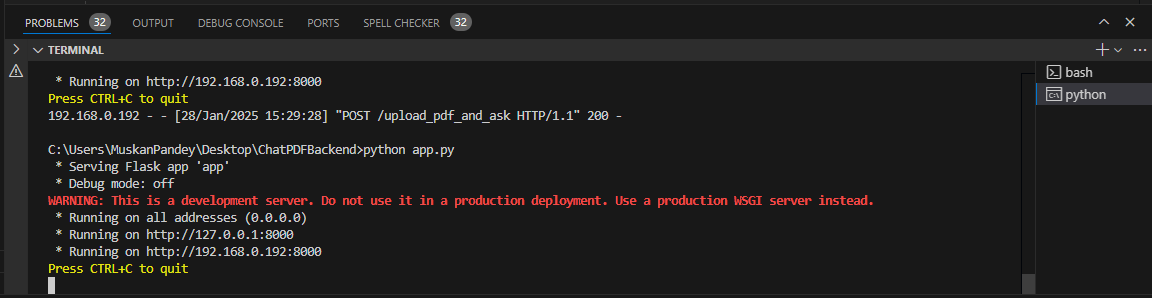
API for test :
local_url/route_pathIn case of our application we can use API
http://192.168.0.192:8000/upload_pdf_and_ask
STEP 05: Deploy your API (RAG Application Backend)
To deploy your application, create a GPU-enabled workspace. Click the Create button located to the left of the organization switcher, and then select Application.
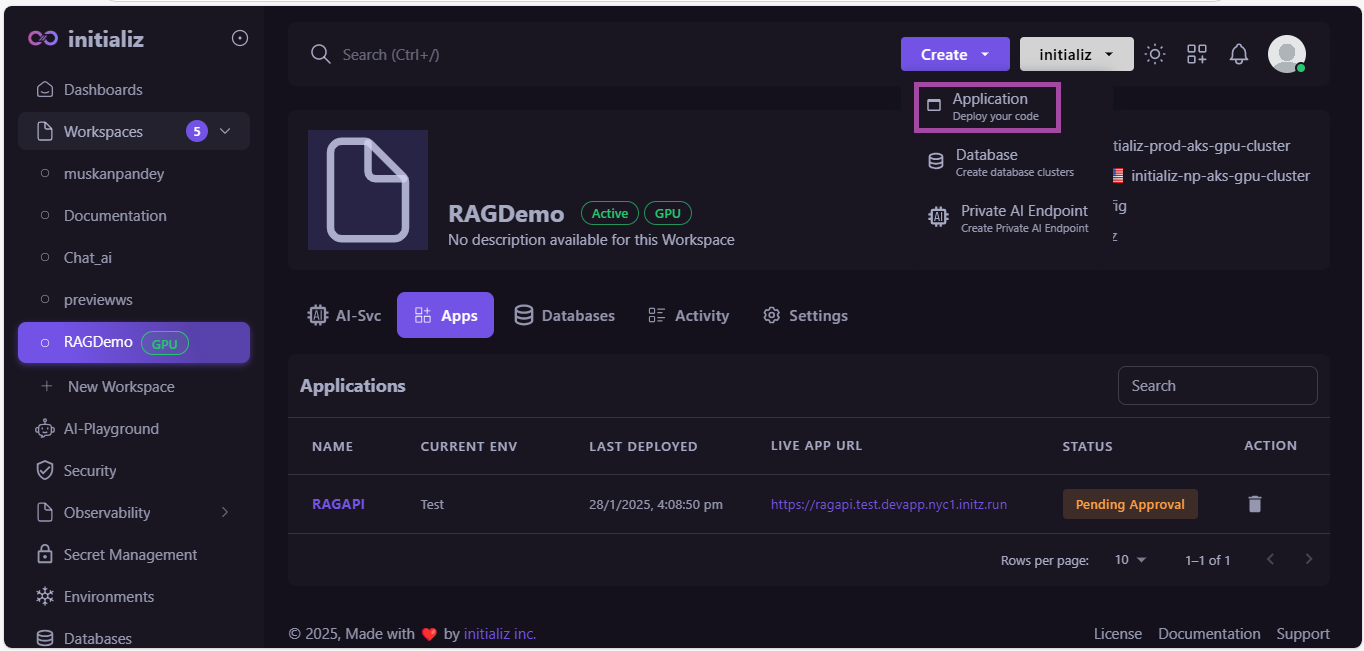
Now follow these steps :
-
Enter all details and select GPU enabled workspace.
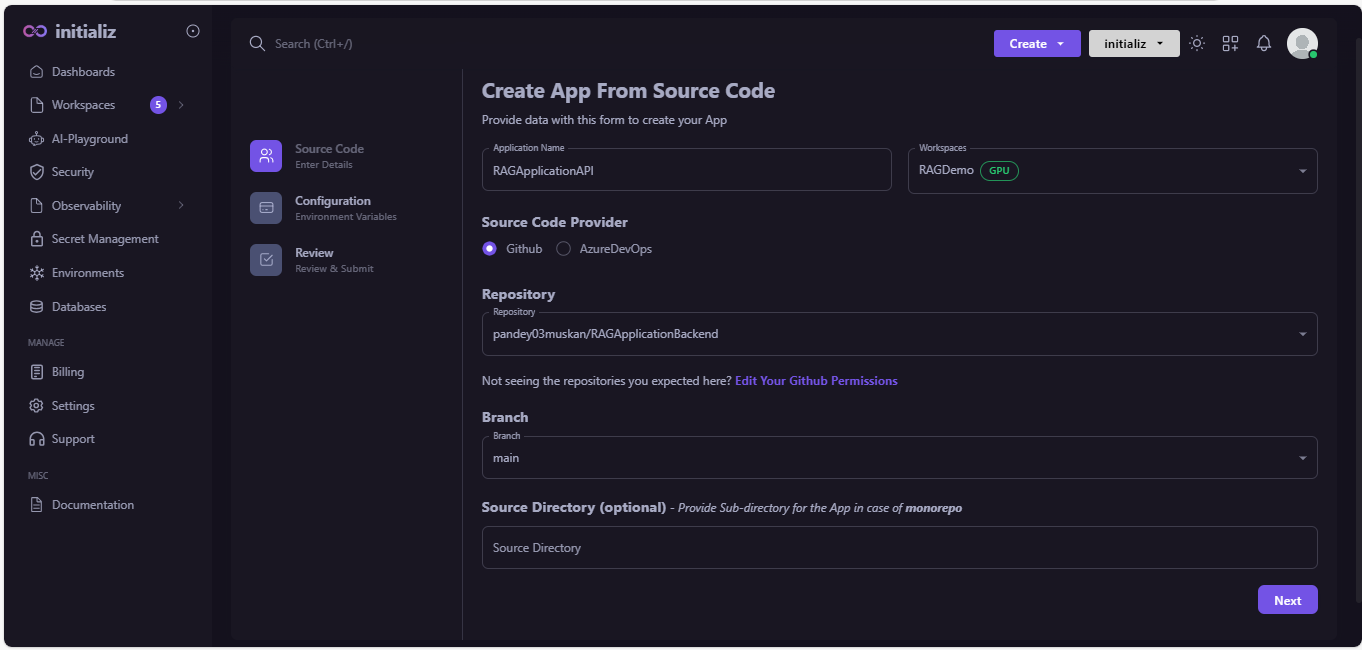
-
Configure Runtime environment variables.
-
You can take all runtime environments by uploading .env file.

-
Configure your application.click on "Next".
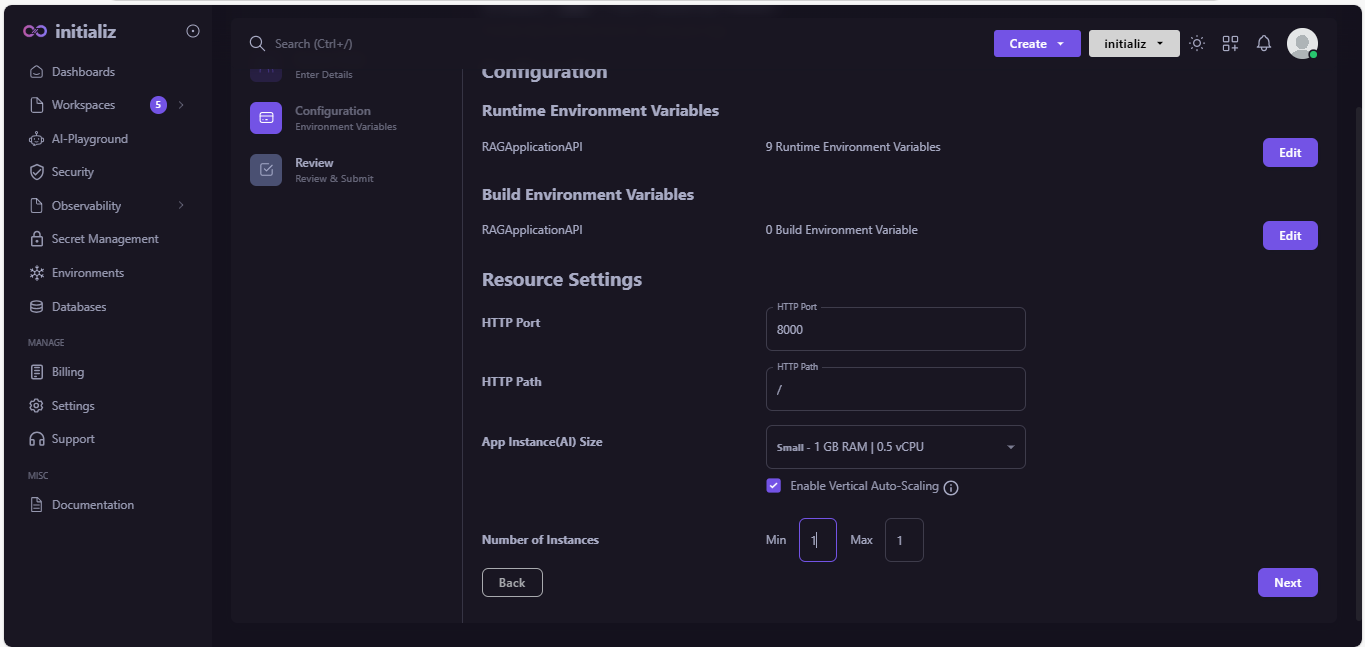
-
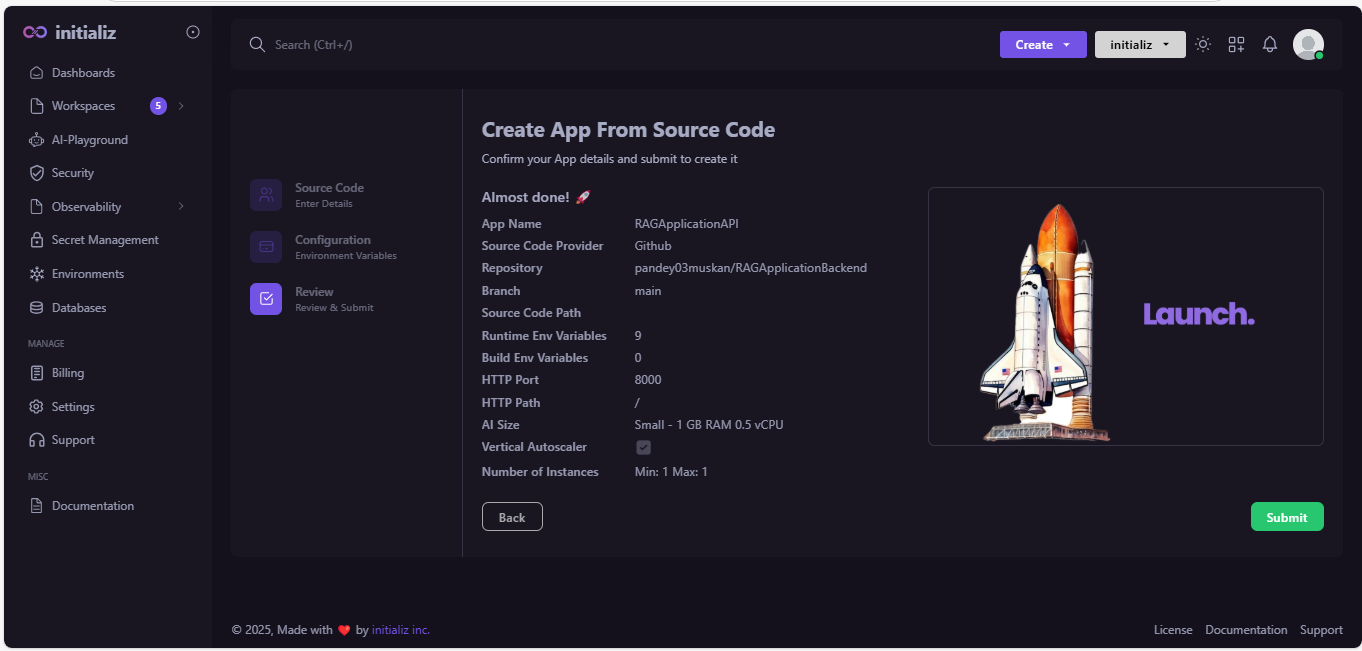
Review the preview screen and confirm all your details. If you need to make any changes, click the "Back" button; otherwise, click "Submit."
-
Once your application get deployed, you will get an endpoint.
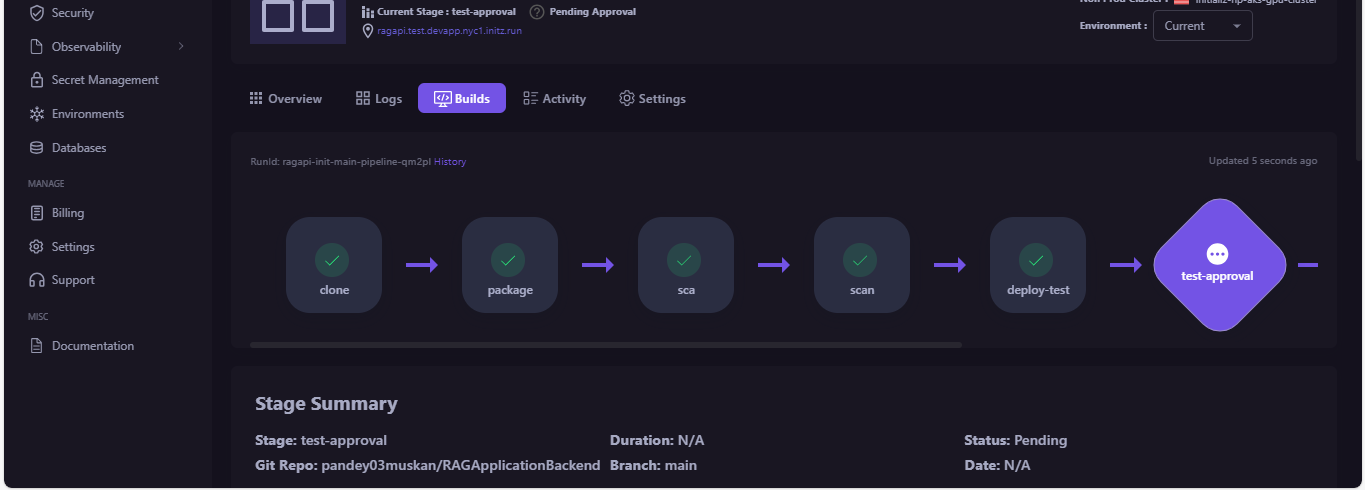
Application Endpoint :
URL_getAfterApplicationDeployment/route_pathIn case of our application :
https://ragapi.test.devapp.nyc1.initz.run/upload_pdf_and_ask
STEP 06: Integration of endpoint
To integrate your endpoint, you need a frontend. Design the frontend and then integrate it with the endpoint.