
Channels and providers
How an agent is reached — HTTP and Slack channels — and how each agent's model provider is selected and managed.
Channels
Channels are how an agent is reached once it's running.
Every platform-built agent exposes an HTTP agent endpoint inside your workspace. This is the channel the platform itself uses: the console's Overview tab chats with the agent through it, and workflows dispatch steps to it. The endpoint, its authentication, and its registration for workflow use are managed for you — the only choice you make is how far it reaches.
Endpoint reachability
The create (and skill-edit) screen's Endpoint reachability picker sets the agent's network exposure:
- Cluster-only — the default. The endpoint is reachable only from inside the platform (the console and workflows still reach it normally).
- Private — reachable inside your private network (for example over a VPN), at a URL the platform provisions.
- Public — reachable from the internet, at a platform-provisioned URL with TLS included.
Which tiers are offered is a platform deployment setting — an environment can offer both, one, or neither (with none offered, agents are cluster-only and the picker says so). How an exposed endpoint is routed is also platform-set; agents only decide whether and how far they're exposed.
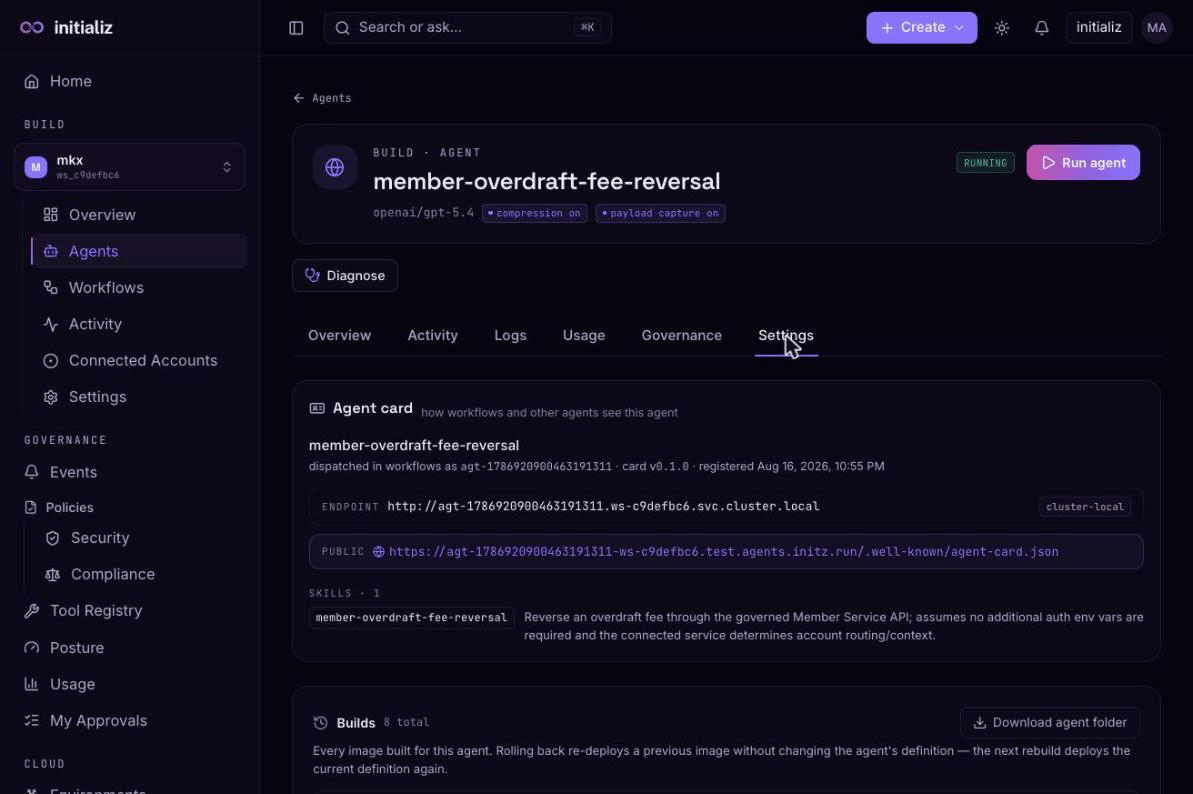
An exposed agent advertises its off-cluster address in its Agent Card,
and the agent's Settings tab shows a clickable public Agent Card link
(…/.well-known/agent-card.json) — the address other systems fetch the
card from. Switching an agent back to cluster-only on a skill edit tears
the exposure down on the next deploy. While an agent is disabled by its
kill switch, the
console hides both the endpoint and the public Agent Card link — a
stopped agent doesn't advertise an invoke address.
Slack
Optionally, an agent can also have a Slack channel: people talk to the agent in Slack, and tool-approval prompts are delivered there too. Enable it on the create (or skill-edit finalize) screen and provide:
- an app token (
xapp-…) and a bot token (xoxb-…) — use a dedicated Slack app per agent; don't reuse an app or bot token across agents, and invite the bot to every Slack channel it should work in; - optionally, a list of allowed bot IDs if other bots should be able to talk to the agent.
Both tokens are handled as secrets: vaulted at deploy, masked in the console, and never readable back. When editing, leaving a token blank keeps the stored value.
For agents deployed from CI, channels are declared in the repository and baked into the image — the console shows them but doesn't edit them. See CI-deployed agents.
Model providers
Each agent has its own model provider and model, chosen on the create screen from the set your platform offers — for example an OpenAI-compatible provider or Anthropic, each with a curated model list. Platform administrators control which providers and models appear.
Each offered provider is a self-contained entry: it carries its own endpoint, credential, authentication scheme, and model list, so several providers — OpenAI-compatible and Anthropic, or several gateways — can be offered side by side in the same picker, each reached the way it needs to be.
Model access is fully managed:
- Requests run through the platform's managed gateway — you never enter provider API keys or base URLs, and actual model credentials never reach the console or your browser.
- The gateway endpoint and authentication are shown read-only in the Managed by the platform panel on the create screen.
For operators wiring providers up, two behavioral options are worth knowing: gateways that hold the real upstream credential themselves can be addressed with a gateway-header-only authentication scheme — the agent sends only the gateway's own key header (the header name is configurable) and suppresses the provider's native auth header, letting the gateway inject the upstream credential. And an OpenAI Responses provider variant is available with a retention opt-out that sends requests with provider-side response storage disabled.
The provider and model are picked at create time and shown on the agent's detail page and on the Agents list. To change them later, use the skill-edit review screen — the current model shows read-only behind an Edit pencil, and a new choice is validated against the offered set and applied with a rebuild. See editing a deployed agent's skill. A model that has been removed from the offering is flagged no longer available on the review screen so you can move the agent off it.