
Register an API from its OpenAPI spec
An org-admin walkthrough — admit a REST API into the Tool Registry from its OpenAPI 3.x document, review the operations the platform discovers, and understand what agents and compliance rules see afterwards.
This guide admits a REST API into the org's Tool Registry so that skills can depend on it. You give the platform the API's base URL and its OpenAPI 3.x document; the platform decomposes the document into individually governed operations. The registry reference page covers the concepts in depth — this page walks the task.
Before you start
- The org admin role. Everyone can view the registry, but registering entries is an org-admin write — the platform enforces this regardless of what the console displays.
- The API's OpenAPI 3.x document, as JSON. You either paste the
document into the form or give a URL the platform fetches it from
(for example
https://api.example.com/openapi.json). The document must be JSON — a YAML spec needs converting first — and there is no file upload. - The API's base URL. The host agents will actually call. It must
be an
http(s)URL, and it can differ from where the spec is served. - An auth decision. How agents authenticate to the API at runtime: unauthenticated, or with a bearer / static token. OAuth is not accepted for API entries — decide up front, because an API registration that requests OAuth is rejected.
Step 1 — open the register form
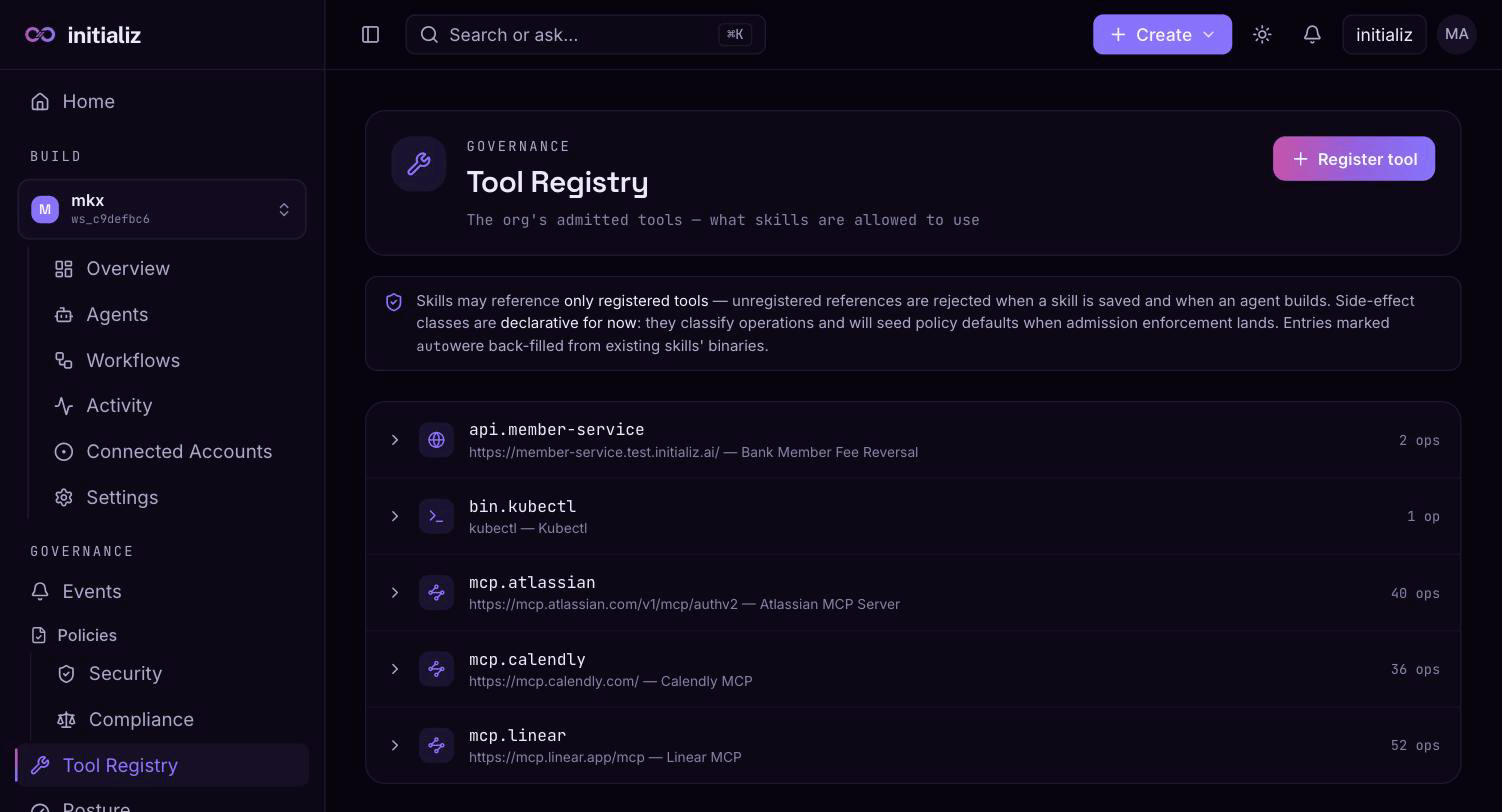
Go to Governance → Tool Registry and click Register tool. Pick the API entry type ("REST from an OpenAPI spec") — the form swaps to the API-specific fields.
Step 2 — key, description, and base URL
- Key — the entry's unique, lowercase name within the org, by
convention prefixed
api.(e.g.api.member-service). Choose it deliberately: the key derives both the platform-assigned token variable and the tool names agents see (Step 6), and registering a duplicate key is rejected. - Description — optional; shown wherever the entry is picked.
- Base URL — the host agents call. The form rejects anything that
is not an
http(s)URL, and the platform validates the same again at admission. Egress from an agent to this host is governed like any tool call — see Step 6.
Step 3 — choose how agents authenticate
The Auth selector offers none, bearer token, or static
token. For bearer and static, the form shows the platform-assigned
token variable — API_<KEY>_TOKEN, derived from the key (e.g.
api.member-service → API_MEMBER_SERVICE_TOKEN). The registry stores
only that name: whoever configures an agent that uses this API is
prompted for the token value at finalize, and the value is vaulted per
agent — never stored on the registry.
OAuth is deliberately not an option here. Unlike MCP servers, API
entries have no OAuth admission flow yet, so an API registration whose
auth type requests oauth is rejected outright rather than admitted in
a broken state. If the API only speaks OAuth, front it differently (or
wait for OAuth support) — don't register it with a placeholder.
Step 4 — provide the spec
Two ways, and the form requires exactly one of them:
- Paste the document. Put the OpenAPI 3.x JSON straight into the OpenAPI spec box. It must parse as JSON — the form rejects anything else before submitting. When a document is pasted, it wins: no fetch happens even if a spec URL is also filled in.
- Give a spec URL. Leave the paste box empty and set Spec URL; the platform fetches the document once, at registration. For a protected spec URL, a Spec fetch token field appears — a one-shot credential sent as a bearer token on that single fetch and never stored. It is independent of the runtime auth you chose in Step 3: any credential that can read the spec works. Because API entries are not refreshed against a live server afterwards, the token really is used exactly once — if you ever re-admit the entry from the same protected URL, you supply it again.
Either way the platform records a digest of the exact document it admitted, so later drift is detectable.
Step 5 — register and review the operations
Click Register. Admission is a static parse — no live call to the API is made — so it either succeeds immediately or fails with the reason (see the troubleshooting section). On success the entry appears in the registry table with its operations expandable inline. Review what was discovered:
- One operation per path + method. Each pair in the document's
pathsbecomes an individually governed operation. - Names come from
operationId. When the spec provides one, that is the operation's name. When it doesn't, the name is derived from the method and path —POST /fees/reversebecomespost_fees_reverse. - The side-effect class comes from the HTTP method. GET, HEAD, and
OPTIONS are
read; DELETE isdestructive; POST, PUT, and PATCH aremutating. Each operation shows its class as a chip. - Typed argument fields. Each operation's path, query, and header
parameters plus the properties of its JSON request body are flattened
into one typed field set (local
$refs resolved inline). These fields are the exact vocabulary compliance rules are authored against, so check they match what you expect to govern.
If an operation looks wrong, fix the spec at its source and re-admit — API entries keep the operations they were registered with; there is no refresh against a live server as there is for MCP entries.
Step 6 — what registration gives agents
Nothing reaches an API until an agent's skill declares the entry as a dependency and selects operations — registration is admission, not wiring. Once a skill does depend on it:
- Each selected operation becomes a runtime tool named
<name>__<operation>, where the name is the key minus itsapi.prefix —api.member-servicewith operationreverse_feesurfaces to the agent asmember-service__reverse_fee. - Compliance rules key on the same address. A rule written against
<server>__<operation>governs that operation's calls over their actual argument values — see Compliance and tool-call decisions. - The base URL's host joins the agent's egress allowlist automatically at deploy, so the agent's outbound calls to the API are not blocked by its deny-all egress posture. Only agents that depend on the entry get this — registering alone opens nothing.
- Bearer/static entries add a required secret at agent finalize:
the
API_<KEY>_TOKENvariable appears in the agent's environment section, and the value you enter is vaulted for that agent.
See Skills for how dependencies are declared and the Tool Registry reference for what else registration feeds.
Troubleshooting
- "OpenAPI admission failed: fetch openapi spec: status 401/403" — the spec URL is protected. Supply a one-shot spec fetch token, or paste the document instead.
- "OpenAPI admission failed: fetch openapi spec: …" (network error) — the platform could not reach the spec URL. Check the URL resolves publicly; the fetch has a short timeout and will not follow a URL into private address space. Pasting the document sidesteps the fetch entirely.
- "parse openapi document" or "openapi document has no paths" —
the document isn't the JSON the parser expects. Confirm it is
OpenAPI 3.x, in JSON (not YAML), with a populated
pathsobject; a document whose paths declare no operations is also rejected. - "a tool with this key is already registered in the org" (409) — keys are unique per org. Pick a different key, or remove the existing entry first — removal is refused while any skill still references it.
- "api.base_url must be a valid http(s) URL" — the base URL needs
an explicit
http://orhttps://scheme. - "api.auth.type must be bearer or static" — the registration requested OAuth, which API entries reject (Step 3).
Register an MCP server in the Tool Registry
An org-admin walkthrough — admit a remote MCP tool server into the org registry, choose how agents authenticate to it, discover its tools, and review the admitted operations.
Set up workspace service connections
A workspace admin walkthrough — create named service accounts for admitted tool servers under Build → Connected Accounts, scope each one to a subset of tools, and bind skills to them by name.